

Apple Notes keeps your thoughts safe and snug. What, though, if you want to take them someplace else — another platform, editor or decade? You don’t have to copy and paste or start from scratch. Find out here how to export from Apple Notes to Markdown files ⤓, a lean plain text markup format that travels light and is made to last.
On This Page
How to Export Notes as Markdown Files from Apple Notes
⚡ Quick Fix
Select File | Export as | Markdown in Notes to save as a an .MD file and Edit | Copy as Markdown to copy select text with Markdown formatting.
Apple Notes for Mac
Time needed: 2 minutes
To save a note (or notes) as a Markdown file from Apple Notes for macOS on a Mac:
- Open or highlight the note you want to export to Markdown.
Export in bulk: Highlight multiple notes to export the lot.
- Select File | Export as | Markdown from the menu.
PDF and Pages: You can also export from Notes to PDF, of course, or edit and save notes as Pages documents.
The key: If you save to Markdown often, you can set up a keyboard shortcut for the exporting action; see below.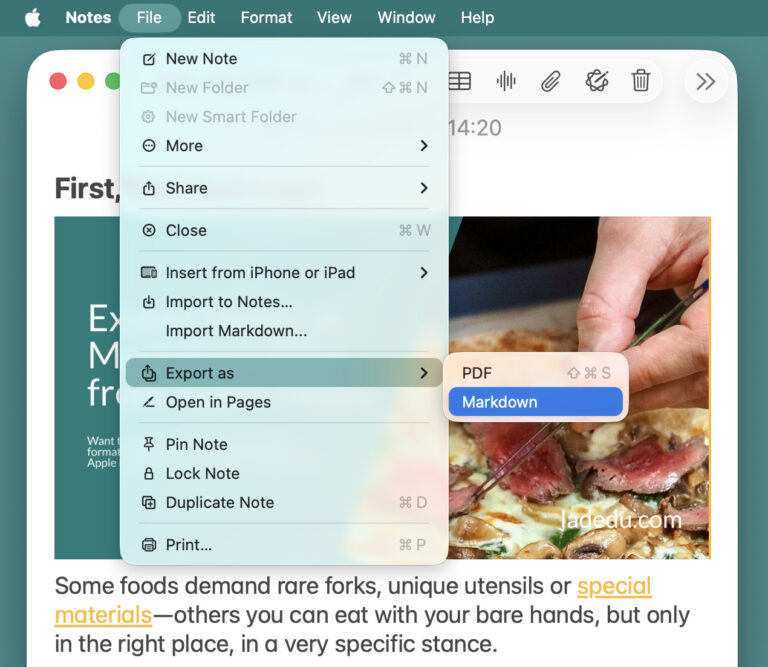
- Choose the folder where you want the exported Markdown files to appear.
- Select Export.
Their word: Apple include information on exporting to Markdown in the Notes User Guide.
Markdown done?
Tips help fuel these email and tech how-tos.
Copy Text Using Markdown Formatting from Apple Notes for Mac
To copy text from a note in Apple Notes for macOS with Markdown formatting:
- Select the text you want to copy with Markdown formatting.
All: To select all, click in the note and press Command A.
Golden Gate: Copying with Markdown formatting is available in Notes 4.13 on macOS Golden Gate 27 and later. - Select Edit | Copy as Markdown from the menu.
Keyboard shortcut: You can set up a keyboard shortcut for copying as Markdown, of course; see below.
Add a Keyboard Shortcut for Exporting to Markdown to Notes for Mac
To set up a keyboard shortcut for saving Markdown files in Apple Notes for Mac:
- Open System Settings.
- Go to the Keyboard category.
- Select Keyboard Shortcuts….
- Open the App Shortcuts category.
- Click +.
- Select Notes under Application.
- Type
Markdownunder Menu title.
Copying: TypeCopy as Markdownfor a keyboard shortcut that copies using Markdown formatting. - Click in the Keyboard shortcut field.
- Press the key combination you want to use for exporting to Markdown.
Example: You can use Command Control M, for example. - Click Done.
Apple Notes for iPhone and iPad
To export a note to a Markdown file using Apple Notes for iPhone and iPad:
- Open the note you want to save as a plain text file with Markdown markup.
Just one: On iOS and iPadOS, you can export individual notes only. - Select the Share button.
- Choose Export as Markdown from the options.
No “Export as Markdown”: If you do not see that choice initially, select View More first.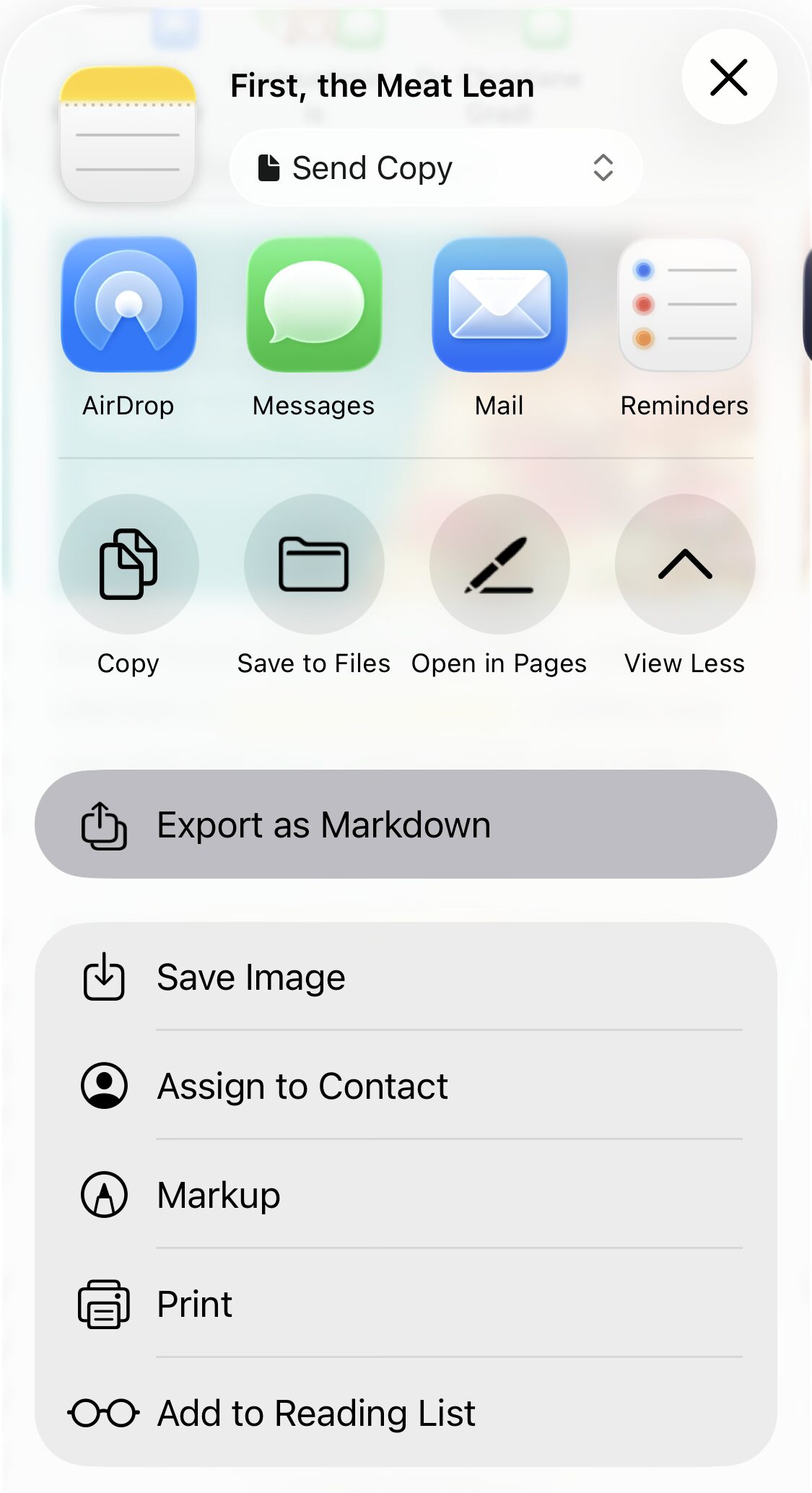
- Choose Save to Files.
Airdrop etc.: You can also use all other sharing options, of course, and copy the resulting folder (for pasting on a Mac, for instance), send it to any app or use Airdrop, for example. - Go to the folder where you want to save the resulting Markdown document (and supporting files).
- Tap Save.
How to Export Notes as Markdown Files in Apple Notes: FAQ
In what structure will the notes be exported?
Notes always creates a new folder for each export to Markdown files. The folder is either named like the note or, if you export multiple notes, “Archive”. The individual notes are exported to files with the first line (truncated to around 75 characters) and the .MD extension.
What happens with attachments (PDF documents, images,…)?
Files included with a note (such as PDF files, images, voice recordings) are saved to an Attachments folder and referenced as links in the exported Markdown file.
What Notes formatting will be preserved in Markdown?
Notes preserves all formatting that can be represented using Markdown in exported files including:
- Headings
- Bold text
- Italics
- Lists
- Checklists
- Links
- Attachments (as linked files)
What Notes formatting will not be saved to .MD files?
Some formatting you can use in Apple Notes does not translate to the Markdown format and will not be saved when you export to the format:
- Highlighting with color
- Text alignment (center, right or justified)
- Typeface choice
- Text size
- Text color
Can I import Markdown files into Notes?
Yes.
Apple Notes can import text and formatting from Markdown (.MD) files.
(Tested with Apple Notes 4 on macOS Golden Gate 27, Tahoe 26 and Apple Notes for iOS 26; first published March 2026, last updated September 2026)