

Scribbled some notes in Markdown, and when you paste into Apple Notes all you get is the plain text? Wouldn’t it make sense for Notes to read the markup and style it? Find out here how to import from Markdown into Apple Notes on Mac, iPhone and iPad ⤓.
On This Page
How to Import from Markdown into Apple Notes (on Mac, iPhone and iPad)
⚡ Quick Fix
Mac: Select Import | Markdown… to import files and Edit | Paste as Markdown… to paste text with Markdown formatting.
iPhone and iPad: Open the Files app, tap and hold the .MD file, select Share and choose Notes.
Import Markdown Files in Apple Notes for Mac
Time needed: 2 minutes
To import Markdown files into Apple Notes on a Mac:
- Collect all Markdown files you want to import into Apple Notes in a folder with macOS Finder.
Here’s why: If you import a folder into Notes, all .MD files in it will turn into new notes in the current Notes folder; if you import individual .MD files, Notes collects them in a new folder for imported items.
- Go to the folder where you want the imported text to appear in Apple Notes.
- Select File | Import Markdown… from the menu.
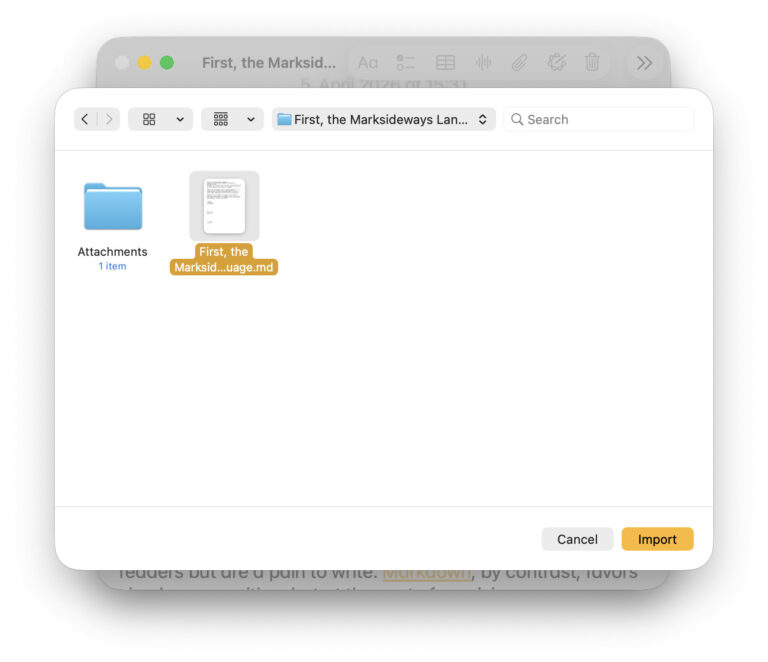
- Find and highlight the folder with the Markdown files you want to import.
Markdown files: You can also highlight individual Markdown (.MD) files, of course, to import them.
Dragging and dropping: Instead of using menu and file selector, Apple Notes for Mac will also accept .MD files or folders dropped on its Dock icon. - Click Import.
Their word: Apple include information on importing Markdown files in the Notes User Guide.
[import to](Apple Notes)
Tips help fuel these email and tech how-tos.
Paste Markdown Text in Apple Notes for Mac
To paste text with Markdown formatting (e.g., from an editor or AI output) right into a note in Apple Notes for Mac:
- Select Edit | Paste as Markdown from the menu.
Here’s what happens: Notes inserts the text and applies formatting corresponding to the Markdown markup.
Golden Gate: Pasting with Markdown formatting is available in Notes 4.13 and later on macOS Golden Gate 27.
Import from Markdown in Apple Notes for iPhone and iPad
To import the text of a Markdown file as a note in Apple Notes for iPhone and iPad:
- Open the Files app.
- Navigate to or search for the Markdown file you want to import.
Just files: Under iOS and iPadOS, you can only import individual .MD files, not folders. - Tap and hold the file.
- Select Share from the context menu.
Elsewhere: You can also share a Markdown file from a text editor or browser, of course, using the sharing menu. - Select Notes in the sharing sheet.
- Tap Import under Import to Notes?.
Here’s what happens: Apple Notes creates a new Imported Notes folder for each import (named Imported Notes, Imported Notes 1, Imported Notes 2, etc.) and imports the note text (but not any attachments) to a new note in that folder.
Out of Google Docs? How to Export a Google Docs Document to a Markdown File
How to Import from Markdown into Apple Notes (on Mac, iPhone and iPad): FAQ
Can I paste Markdown into a Note to import?
Yes.
While pasting text with Markdown formatting normally will insert it as plain text, you can use Paste s Markdown to keep the formatting; see above.
Another way to get text into Notes: How to Scan Editable Text into a Note with Apple Notes for iPhone
Will images be imported, too?
Only under certain circumstances.
Normally, Notes handles images like links: the description is linked to the target.
Exception: Images with the alt text "Import from" and a reference to an image in a sub-folder called "Attachments" are inserted directly during importing.
Example:  in Markdown will insert the image ladedu.png found in the Attachments folder.
Can I export back to Markdown from Apple Notes?
Yes.
Apple Notes can turn notes into Markdown files on both macOS and iOS.
(Tested with Apple Notes 4 for macOS and iOS 26; first published April 2026, last updated September 2026)