

You’ve written something fabulously glorious in Google Docs, and now it’s time to take it somewhere leaner — a blog perhaps, a static site or a README on GitHub. Do you have to leave all the formatting behind, though? Of course not: find out here how to export a Google Docs document to a Markdown file ⤓.
On This Page
How to Export a Google Docs Document to a Markdown File
Time needed: 2 minutes
To save a Google Docs document as a Markdown file:
- Open the document you want to save as a Markdown file in Google Docs.
- Select File | Download | Markdown (.md) from the menu.
- Save the exported Markdown (.MD) file to the desired location.
Filename: The file name for the Markdown file is [Google Docs document title].md.
Their word: Google include information on exporting to Markdown in Docs help.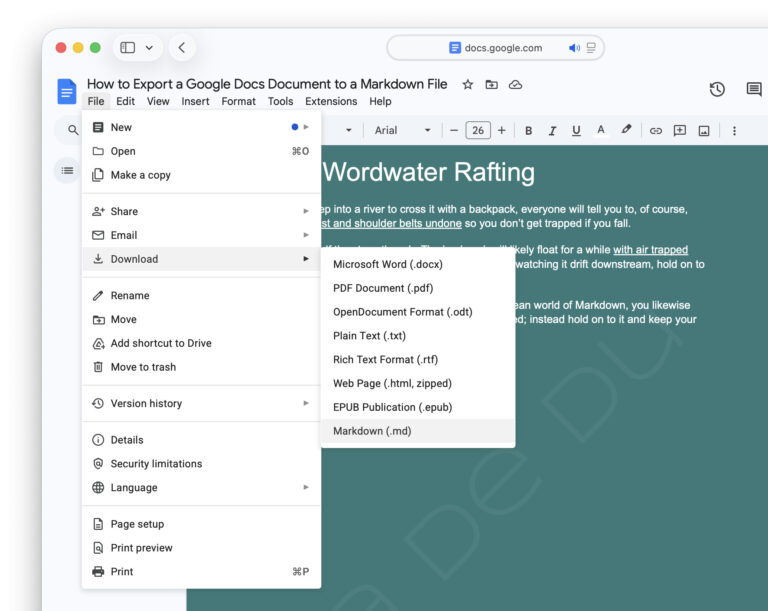
On your mark! Ready! Down!
Tips help fuel these email and tech how-tos.
How to Export a Google Docs Document to a Markdown File: FAQ
What happens to images included in a document?
When you export to Markdown from Google Docs, images are included in the plain text Markdown file encoded in Base64 with the image references pointing inline.
What happens to Google Docs formatting not supported in Markdown?
All formatting not supported in Markdown is silently dropped from the downloaded .MD file. Only the plain text remains.
Which Markdown features does Google Docs support?
Google Docs supports most essential Markdown features as well as a few extensions.
Markdown Features and Extensions Supported in Google Docs
- Headers
- Setext headers
- Text formatting for emphasis (including strikethrough)
- Links
- Images
- Blockquotes
- Ordered and unordered lists
- Task lists
- Inline code
- Tables
- Footnotes
Markdown Features and Extensions Not Supported in Google Docs
- Code blocks (with or without syntax highlighting)
- Definition lists
- Emoji
- Sub- and superscript
- Math
- Citations
Back into Docs: How to Import from Markdown into Google Docs
On to Notes: How to Import from Markdown into Apple Notes (Mac, iPhone, iPad)
(Tested with Google Docs; first published April 2026)