

Wish you could insert superscript letters without awkward formatting tricks tied to specific software? Want to write ordinal numbers, chemical formulas and abbreviations without fuss? Find out here how to input superscript letters on a Mac ⤓ using built-in tools.
On This Page
How to Input Superscript Letters (ᴬᴮᴰ) on a Mac
Using Mac Character Viewer or the Emoji Panel
Time needed: 2 minutes
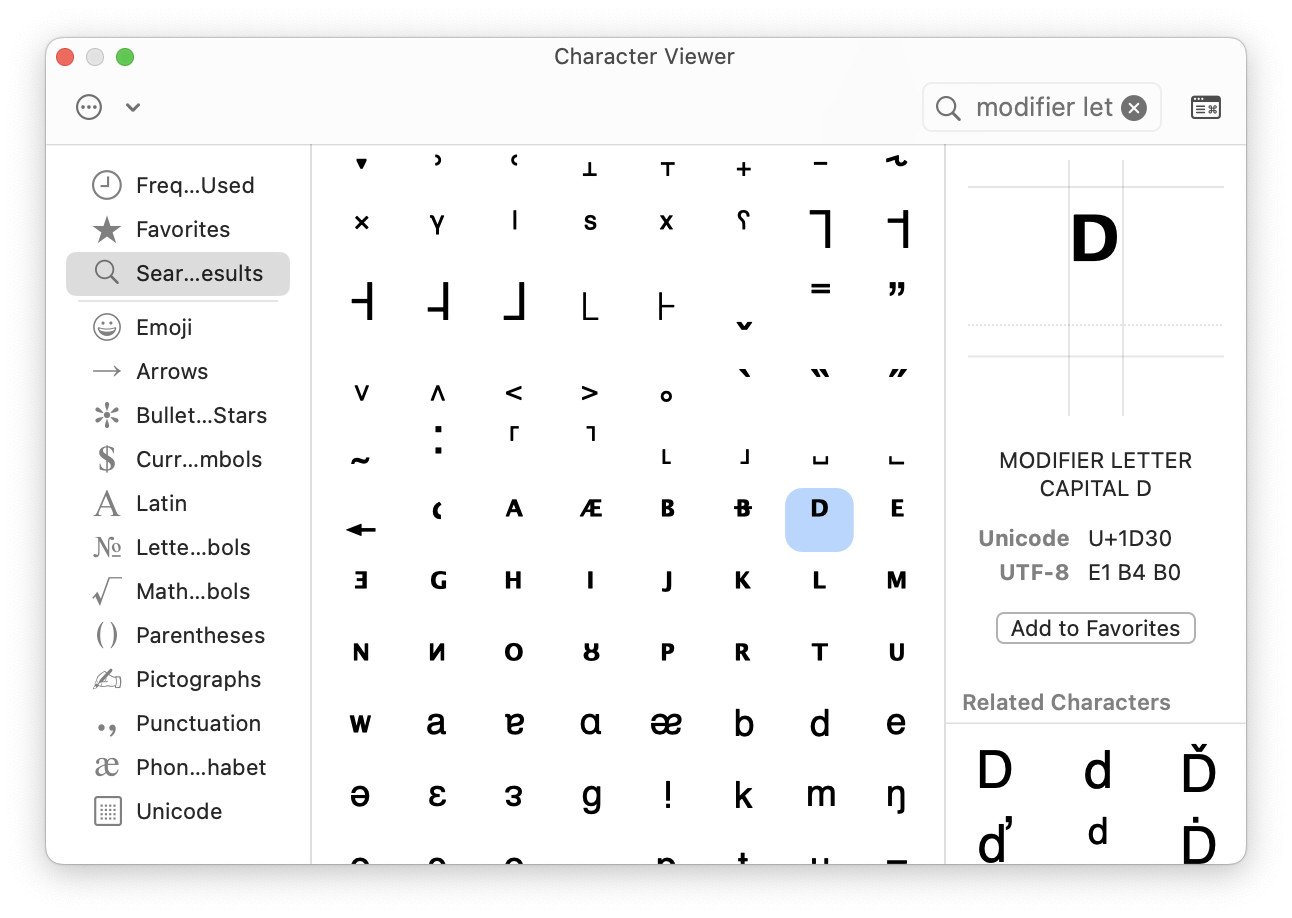
To find and insert a superscript letter from Unicode on a Mac using macOS Character Viewer or the emoji panel:
- Position the text cursor where you want to input the superscripted letter.
- Bring up emoji panel or Character Viewer.
Here’s how: Select Edit | Emoji & Symbols from the menu.
Mac keyboard shortcut: You can also press 🌐︎ or Fn E to open Character Viewer. - Type
modifier letterin the search field.Upper or lower case: You can search with more precisions using
modifier letter smallfor lowercase superscript letters andmodifier letter capitalfor uppercase letters. - Double-click the desired superscript letter to insert it.
What’s missing: Unicode does not include superscript version of the following letters: c, f, q, Q, x, y and z.
Scripted ˢᵘᵖᵉʳ?
Tips help fuel these email and tech how-tos.
Using Mac Unicode Hex Input to Input Superscript Letters
To input superscript letters using their Unicode code points on a Mac:
- Enable and switch to Unicode Hex Input on your Mac.
- Press and hold Option.
- Type the number that corresponds to the superscript letter you want to insert.
Example: Type02E1for the superscript lowercase l (ˡ). - Let go of the key Option.
Unicode Code Points for Lowercase Superscript Letters
| Character | Unicode Code Point |
|---|---|
| ᵃ | 1D43 |
| ᵇ | 1D47 |
| ᶜ | 1D9C |
| ᵈ | 1D48 |
| ᵉ | 1D49 |
| ᶠ | 1DA0 |
| ᵍ | 1D4D |
| ʰ | 02B0 |
| ⁱ | 2071 |
| ʲ | 02B2 |
| ᵏ | 1D4F |
| ˡ | 02E1 |
| ᵐ | 1D50 |
| ⁿ | 207F |
| ᵒ | 1D52 |
| ᵖ | 1D56 |
| ʳ | 02B3 |
| ˢ | 02E2 |
| ᵗ | 1D57 |
| ᵘ | 1D58 |
| ᵛ | 1D5B |
| ʷ | 02B7 |
| ˣ | 02E3 |
| ʸ | 02B8 |
| ᶻ | 1DBB |
Unicode Code Points for Uppercase Superscript Letters
| Character | Unicode Code Point |
|---|---|
| ᴬ | 1D2C |
| ᴮ | 1D2E |
| ᴰ | 1D30 |
| ᴱ | 1D31 |
| ᴳ | 1D33 |
| ᴴ | 1D34 |
| ᴵ | 1D35 |
| ᴶ | 1D36 |
| ᴷ | 1D37 |
| ᴸ | 1D38 |
| ᴹ | 1D39 |
| ᴺ | 1D3A |
| ᴼ | 1D3C |
| ᴾ | 1D3E |
| ᴿ | 1D3F |
| ᵀ | 1D40 |
| ᵁ | 1D41 |
| ⱽ | 2C7D |
| ᵂ | 1D42 |
How to Input Superscript Letters on a Mac: FAQ
How can I produce the superscript letters missing from Unicode?
You can make superscript versions of all characters in word processing and editing apps that allow for changing the baseline shift (or have a superscript formatting outright).
Superscript formatting works in word processing software, of course:
- How to Insert Superscript Characters in Apple Pages
- How to Make Superscript Characters in MS Word
- How to Insert Superscript Characters in Google Docs
You can also make characters superscript in Notes, though:
(Tested with macOS Tahoe 26.4 and Sequoia 15.6; first published September 2025, last updated April 2026)