
Want to open two emails side by side or a reply alongside the original message perhaps? You don't have to open Fastmail in two browser windows. Find out here how to open an email or reply in new, separate Fastmail window ⤓ instead.
On This Page
How to Open an Email or Reply in a New Window with Fastmail
⚡ Quick Fix
From the message list and for composing: Hold Shift while you click an email to open it or click Compose, Reply or Forward.
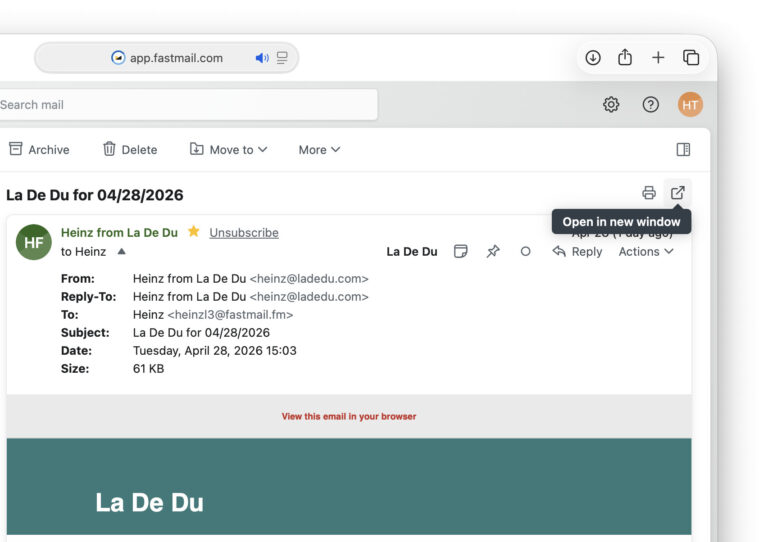
From an open email: Click the Open in new window (square with an arrow) button.
Pop Out an Existing Email or Reply
Time needed: 1 minute
To open an email you are viewing or composing in Fastmail in its own browser window:
- Open the message or start composing the message, reply or forward in Fastmail.
- Click the Open in new window button.
Their word: Fastmail include information on opening messages in a separate window in mail help.
4 sets of 8 pop-outs done?
Tips help fuel these email and tech how-tos.
Open an Email or Reply in a New Fastmail Window
To open a message in its own browser window or start a new message or reply in a separate window with Fastmail:
- Hold Shift while you click the message to open it or while you click Reply or Compose to start in a new window.
Fastmail keyboard shortcuts: To start composing in a new window, press Alt Shift C (Windows, Linux) or Option Shift C (Mac); to start a reply in a separate window, press Alt Shift R (Windows, Linux) or Option Shift R (Mac), and press Alt Shift A (Windows, Linux) or Option Shift A (Mac) to reply to all in a new window.
Are you an email and, if so, how many? How to Turn Off or Enable Conversation Grouping in Fastmail
How to Open an Email or Reply in a New Window with Fastmail: FAQ
Is there a keyboard shortcut for popping out an already open email?
No.
To open an email you are viewing or composing, use the Open in new window button (or your browser’s keyboard navigation to highlight and use the button using the keyboard).
Can I open multiple emails in separate windows?
Yes.
You can, of course, open multiple emails and messages you are writing each in their own Fastmail window. You do have to pop out each message individually, though; there’s no way to select multiple messages and open them in separate windows in one go.
(Tested with Fastmail in a desktop browser; first published April 2026, last updated October 2026)