
Need to show a right angle without typing out “right angle” or “90°”? Perhaps you’re labeling diagrams, solving homework or drafting a geometry quiz, and just the right symbol is nowhere in sight. Find out here how to insert the right angle symbol ⤓ on right about any device (Mac, Windows, iPhone, Android, LaTeX etc.).
On This Page
How to Insert the Right Angle Symbol ( ⦜ ) on Windows, Mac and Mobile
Using Copy and Paste
(Windows, Mac, Linux, iPhone, Android…)
Time needed: 2 minutes
To insert a symbol to indicate a right angle:
- Click Copy for the right-angle symbol you want to use in the table below.
- Position the cursor where you want the symbol to appear.
- Paste the right-angle sign.
Here’s how: Press Ctrl V (Windows, Linux) or Command V (Mac).
Not looking right: If the symbol does not look right, find a font that includes it (Lucida Sans Unicode, Noto Sans and DejaVu Sans are safe bets for most characters).
Their word: Unicode include the right angle symbols in Mathematical Operators.
Right angle with indicator ⊾ | |
Right angle with dot ⦝ | |
Right angle with square ⦜ | |
Simple right angle ∟ |
Top left ⌜ | |
Bottom left ⌞ | |
Top right ⌝ | |
Bottom right ⌟ |
Triangular ruler 📐 |
Not just right angles: How to Insert the Angle Symbol in Word
Windows: Using Character Map
To insert a right-angle sign using the Windows Character Map:
- Open Character Map.
Using Start menu: Press Windows for the start menu, start typingcharacter mapand click the Character Map application. - Select Lucida Sans Unicode under Font :.
- Check Advanced view.
- Type
right angleunder Search for :. - Double-click the Right Angle or Right Angle With Arc character.
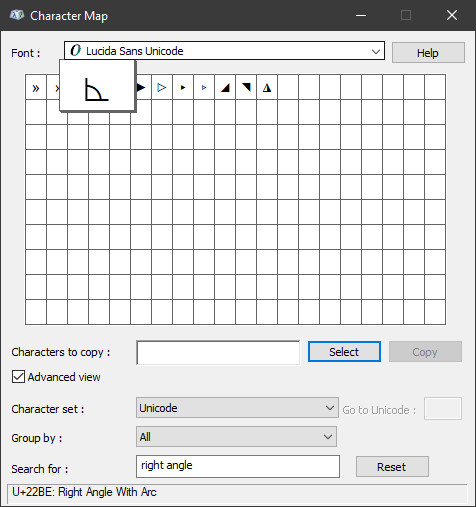
Alternatives: On Windows, you can also use other methods to insert Unicode characters, of course; see below for the Unicode UTF codes for various right-angle characters.
Found just the right ⦜?
Tips help fuel these email and tech how-tos.
Mac: Using Character Viewer
To add a right-angle symbol on a Mac using Character Viewer:
- Select Edit | Emoji & Symbols from the menu on a Mac.
Mac keyboard shortcut: Press Command Control Space or 🌐 (globe) to quickly open Character Viewer or the emoji panel. - Type
right anglein the search field.
Both dialogs: This works in both the emoji dialog and Character Viewer. - Double-click the right angle sign you want to enter.
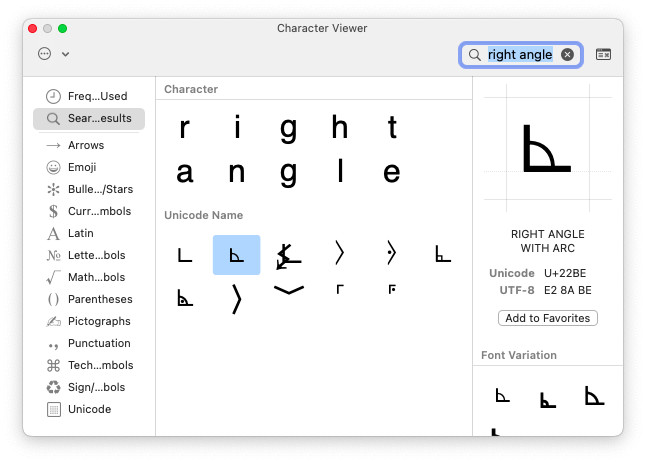
Alternatives: A Mac offers other ways to insert Unicode characters; you can use them to insert the symbols from the table below, of course.
Degrees: How to Find the Degrees Symbol ( ° ) on a Mac Keyboard
iOS and Android: Using an Emoji Keyboard
You can use the triangular ruler emoji to indicate a right angle on iPhone and Android.
To insert the ruler:
- Open the emoji keyboard.
- Look for and insert 📐.
Search: Try searching forruler.
Degrees: How to Type the Degrees Symbol ( ° ) on iPhone (Any Lang)
How to Insert the Right Angle Symbol: FAQ
Can I insert a right-angle sign using HTML?
Yes, you can use the Unicode codepoint equivalents to insert right angle symbols in HTML code:
| Symbol | Unicode UTF-16 | HTML Entity |
|---|---|---|
⊾ | 0x22BE | ⊾ |
⦝ | 0x299D | ⦝ |
⦜ | 0x299C | ⦜ |
∟ | 0x221F | ∟ |
⌜ | 0x231C | ⌜ |
⌞ | 0x231E | ⌞ |
⌝ | 0x231D | ⌝ |
⌟ | 0x231F | ⌟ |
📐 | 0xD83D 0xDCD0 | 📐 |
Is there a right-angle symbol for TeX and LaTeX?
No.
While no right-angle character is built into LaTeX, you can resort to packages, of course:
amsmath
You can use the angle symbol, for example, from amsmath:
\usepackage{amsmath}
…
$\angle$ 90$^{\circ}$
$\angle{ABC}$ 90$^{\circ}$
This results in
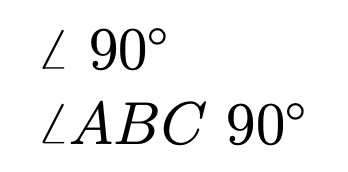 .
.
unicode-math
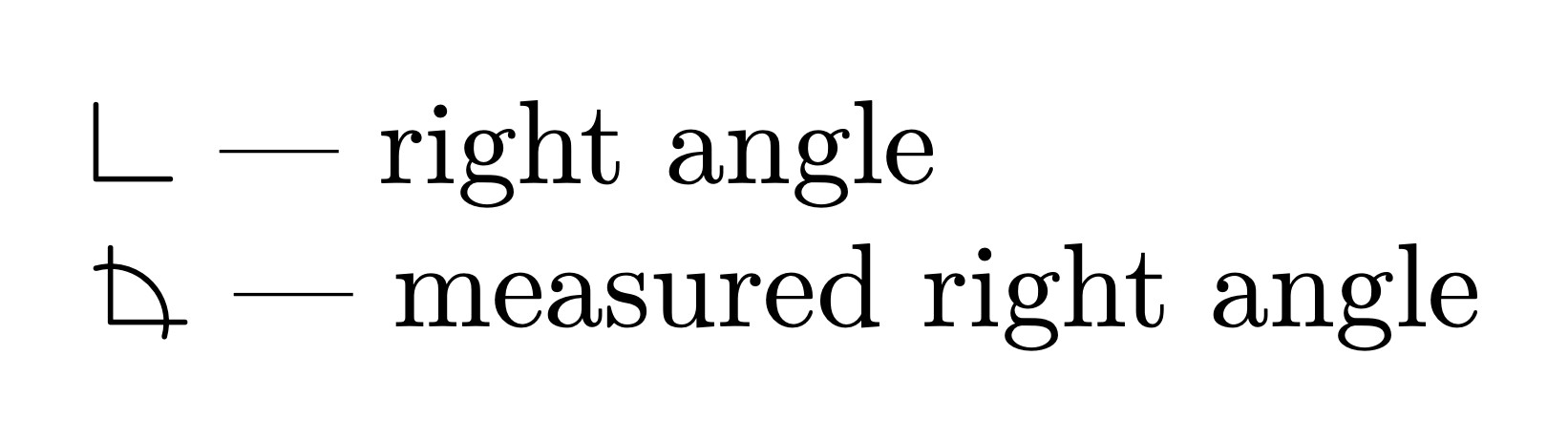
With the unicode-math package, you can use Unicode symbols for right angles:
\usepackage{unicode-math}
…
$\rightangle$ --- right angle

$\measuredrightangle$ --- measured right angle

With very limited font support:

$\rightanglemdot$ --- measured right angle with dot

$\rightanglesqr$ --- right angle with square
The result is for the first two symbols
 .
.
As an alternative, you can construct your own right angle symbol in LaTeX.
(Tested with Mac, Windows and Linux; first published October 2021, last updated July 2026)