

Trying to make an ordinal number with small raised letters (like 1ˢᵗ)? Wresting to get a chemical formulae right on a website or add a footnote to a document? Find out here how to insert superscript letters on Windows using Character Map or simply using copying and pasting.
First, the Air-Do Just Right
No lighter than air, and no heavier either — just right: a balloon floats with the air and wind, gracefully one with its surroundings.
To get up there, a hot-air balloon first needs to become lighter than the air that surrounds it, of course: a flame some impressive 6 meters (19 feet) high provides the energy to lift and light up the envelope.
Now, how about lifting letters to float above the line just like small and neat little balloOns?
How to Insert Superscript Letters on Windows
Using Windows Character Map
Time needed: 3 minutes
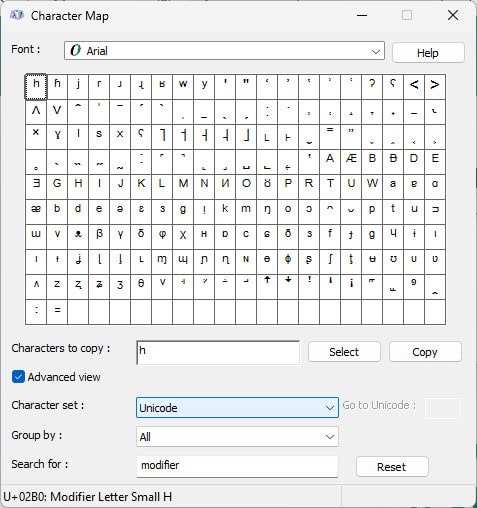
To insert a superscript letter on Windows using Character Map:
- Open Character Map.
Here’s how: You can press Windows, for example, to open Start menu, start typing
character map, and then select Character Map from search results. - Click the Search for : field.
No search: If you do not see Search for :, select Advanced view to access the field.
- Type
modifierin the Search for : field. - Click Search.
- Highlight the superscript letter you want to insert.
- Click Select.
- Now click Copy to copy the superscripted letter the clipboard for pasting.
Superscript issues?
🔎 Check Unicode composition 1ˢᵗ
Unicode Viewer PRO: private, offline app • file drag/drop • one-time → lifetime • no ads
Copy and Paste Superscript Letters
To paste superscript letters anywhere on Windows, copy them using the tables below:
Uppercase Superscript Letters
Lowercase Superscript Letters
In Word Processing Software
In lieu of inserting superscript Unicode letters, you can also format any character’s baseline shift and size in word processing software, of course:
- How to Make Superscript Characters in MS Word
- How to Insert Superscript Characters in Google Docs
- How to Insert Superscript Characters in Apple Pages
How to Insert Superscript Letters on Windows: FAQ
Can I insert superscript letters using PowerToys Quick Accent?
No.
Quick Accents does not include superscript characters.
Can I input superscript letters with Windows “Alt” codes?
No.
Windows does not include “Alt” codes for inserting superscripted letters.
(Tested with Windows 11 Version 24H2; first published September 2025)