

Took a screenshot to save a frame from a video — and every time you zoom in you’re disappointed? You can export stills with full resolution using Photos alone. Find out here how to export a frame as a picture from a video on an iPhone ⤓.
On This Page
How to Export a Frame as a Picture from a Video Using Only Apple Photos for iPhone
⚡ Quick Fix
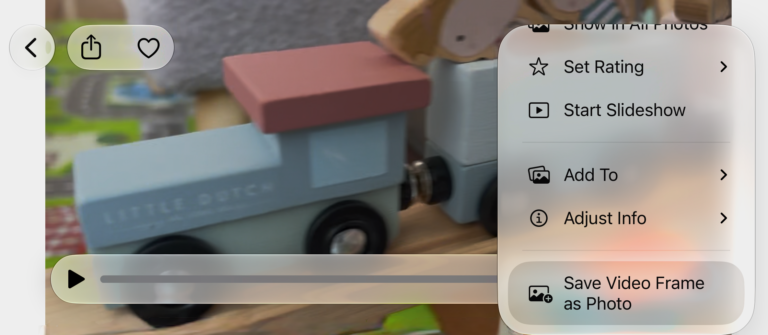
Navigate to the moment in the video you’d like to save in Photos, then select Save Video Frame as Photo from the three dots menu.
Time needed: 2 minutes
To save any frame from a video as a still image on an iPhone using only the Photos app:
- Open the video from which you want to save a frame in Photos.
- Pause video playback.
Here’s why: Only when the video is paused, you can scroll to the exact frame you want to export.
- Scroll to the frame you want to save as a picture.
Fast and slow: Start scrolling using the navigation bar, then move the finger down to speed up scrolling and move the finger up for precision scrolling frame by frame.
- Open the three dots menu button.
- Select Save Video Frame as Photo from the menu that has appeared.
Videos learned to stand still?
Tips help fuel these email and tech how-tos.
Save a Frame from a Live Photo as a New Image
To save a specific frame as a new image from a Live Photo in Apple Photos for iPhone:
- Open the image from which you want to save a different key frame in Photos.
- Tap the three dots menu button.
- Select Duplicate, then confirm Duplicate.
Still photo: If you just want to save the current frame as a new still image, you can choose Duplicate as Still Photo, of course, and be done. - Now tap the editing button.
- Open the Live controls.
- Select the frame you want to save.
- Select Make Key Photo.
- Now tap Done.
Original: The original image is preserved as the duplicate you created before.
Really trying to take a screenshot?
How to Make a Screenshot on an iPhone
How to Export a Frame as a Picture from a Video Using Only Apple Photos for iPhone: FAQ
In what format will exported frames be saved?
Stills from videos are saved as HEIF images with the date of the video. The file name is the video’s file name with _still attached.
Where can I find the still image?
The exported picture appears in your main Photos library. Since the image carries the same date as the original video, it may appear back in the timeline.
You can also find saved stills in the Recent Days collection under Saved Today.
What resolution will the image have?
The resolution of the exported image depends entirely on the original video. A still image from a 1080p video will have a typical resolution of 1920×1080 pixels, for example.
One a Mac?
How to Extract a Still Image from a Movie on a Mac
(Tested with Photos on iOS 27; first published September 2026)