
The iCloud Mail trash folder empties automatically after a while, but what if you need certain messages gone for good immediately? Find out here how to empty the “Trash” in iCloud Mail ⤓ entirely or permanently delete individual emails.
On This Page
How to Empty the Trash in iCloud Mail
⚡ Quick Fix
Click the Settings gear icon in the mailboxes list at iCloud.com, select Empty Trash from the menu and confirm.
Time needed: 1 minute
To permanently delete all emails from the iCloud Mail trash folder at iCloud.com:
- Display the folders list in iCloud Mail.
Here’s how: Select < or < Mailboxes if you do not see the list of your iCloud Mail folders on the left.
- Click the Settings gear icon in the folder list.
- Select Empty Trash from the menu that appears.
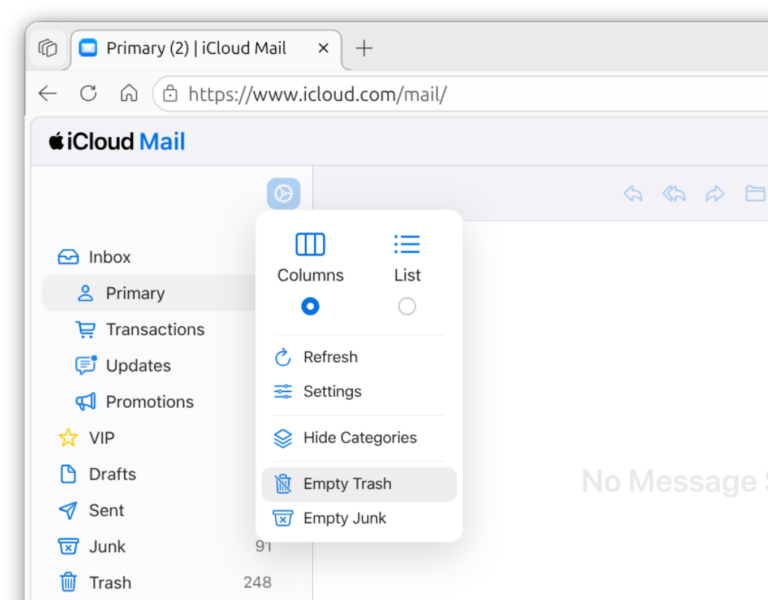
- Confirm with Empty Trash again.
Important: This erases all emails in the Trash folder; you cannot recover these messages.
Their word: Apple include information on deleting emails in the iCloud User Guide.
New vacancy?
Tips help fuel these email and tech how-tos.
How to Empty the Trash in iCloud Mail: FAQ
Does iCloud Mail empty the “Trash” folder automatically?
Yes.
Emails are kept in the Trash folder for 30 days. Once an email has spent 30 days there, it is permanently erased.
Can I delete an email bypassing the “Trash” in iCloud Mail?
To permanently delete an individual email in iCloud Mail:
- Go to the Trash folder in iCloud Mail.
- Find and highlight the email or emails you want to delete irrevocably.
- Select Delete or the Delete Message button in the toolbar.
Set Up iCloud Mail to Delete Emails Immediately
To configure iCloud Mail so it does not move messages to the Trash folder when you delete but erases them immediately:
- Go to the folder list in iCloud Mail.
- Click the Settings gear icon.
- Select Settings in the menu that appears.
- Go to the Mailbox Behavior category.
- Turn off Move deleted messages to:.
Other email services:
How to Empty the Trash in Gmail
How to Empty the Trash in Yahoo Mail
How to Empty “Trash” and “Spam” in Proton Mail
(Tested with iCloud Mail at iCloud.com; first published November 2026)