

Your cursor is blending in too well with its surroundings on the screen — or feeling a bit too monochrome for your taste? Sure, a mouse cursor looks good clad in nihilistic black, but what if you could dress it up in bright red or a calming blue instead? Find out here how to change the color of the mouse cursor on a Mac ⤓ and make your pointer truly stand out.
On This Page
How to Change the Mouse Cursor Color on a Mac
Time needed: 2 minutes
To alter the color of your macOS mouse cursor on a Mac:
- Open System Settings on the Mac.
Here’s how: You can click the Apple logo () in the menu bar, for example, and select System Settings… from the menu.
- Go to the Accessibility category.
- Select Display (under vision).
- Click the current pointer color under Pointer fill color.
- Choose the color picker to select. the color you want to use as the fill color for your Mac cursor.
Not much to fill: Note that, with small cursor sizes, the fixed-width outline makes up a considerable part of the cursor; the fill color applies to only to the inner part.
Right away: You will see the cursor change right away as you select a color in the color picker. - Pick an outline color as well under Pointer outline color.
Example: You can make the fill color white and the outline black, for instance, to effectively revert the default cursor colors.
Their word: Apple include information on changing the macOS cursor color in the Mac User Guide.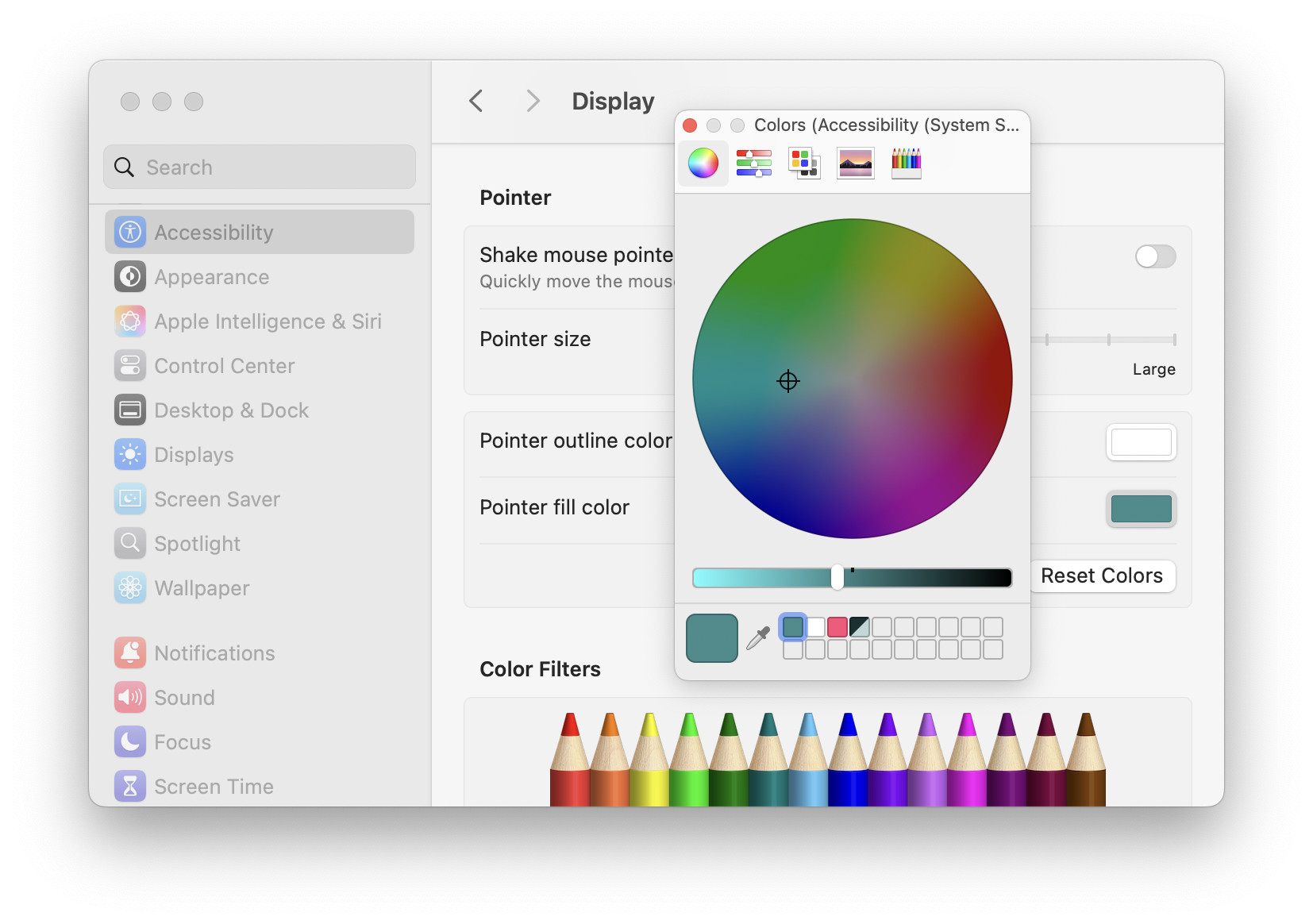
Cursor color customized?
Tips help fuel these email and tech how-tos.
How to Change the Mouse Cursor Color on a Mac: FAQ
Can I change the cursor shape as well?
No, not with macOS alone.
Using macOS settings, you cannot change the shape of the default mouse cursor.
Yes, with add-ons.
Using a third-party tool (like most prominently Mousescape), you can replace the default mouse cursors on macOS with custom designs.
Mouse scrolling in the “wrong” direction? How to Reverse the Mouse Scroll Direction on a Mac
Will color filters change the mouse cursor color?
Yes.
If you apply a color filter to the macOS interface (such as using grayscale mode to reduce distraction), the filter will also apply to custom mouse cursor colors.
More colors:
How to Change the Default Folder Color on a Mac
How to Set up Tags to Organize Files on a Mac
(Tested with macOS Tahoe 26.0–26.5 and Sequoia 15.2–15.5; first published January 2025, last updated June 2026)