

Struggling to typeset exponents properly? Wondering how to get LaTeX to produce tiny, raised letters for ordinal numbers or chemical formulas — without wrecking your carefully chosen line heights? Find out here how to use superscript characters in LaTeX ⤓.
On This Page
How to Use Superscript Characters in LaTeX (Without Wrecking Line Height)
Time needed: 2 minutes
To render characters superscript in text mode using LaTeX:
Use \textsuperscript{}in LaTeX text mode or math mode to apply superscript formatting to characters.Example:
3\textsuperscript{rd}will render as 3ʳᵈ.- In LaTeX math mode, you can also use
^to typeset exponents as superscripted letters.Example: Use
$7^n$to produce 7ⁿ.
Their word: You can also find information on super- and subscripting in the unofficial LaTeX manual.
Tiny letters feeling superior in L a T e X ?
Tips help fuel these email and tech how-tos.
How to Use Superscript Characters in LaTeX: FAQ
Can I control the typeface size and offset of a LaTeX superscript?
Yes.
Using \raise, you can shift characters above the baseline in LaTeX. Together with setting the font size, you can adapt superscript characters to your needs or preferences.
To typeset superscript characters using \raise in LaTeX:
- Use
\raise1ex\hbox{\tiny}.
Here’s why: \raise1ex shift the baseline by around the height of a lowercase character x in the current typeface;\tinysets the size of the typeface for the following characters inside the\hbox.
What to adapt: You can change the amount of baseline shift using the parameter following \raise, e.g. \raise0.5ex will shift by half the height of the letter x; to change the size of the superscript letters, replace\tinywith other font sizes such as\footnotesizeor\small, for instance.
Example:3\raise1ex\hbox{\tiny rd}will produce 3ʳᵈ.
Can I prevent superscript letters from increasing the line height?
Yes.
You can tell LaTeX to ignore superscript letters for determining line height if you enclose them with \smash{}.
Can I use Unicode superscript letters in LaTeX?
Yes.
Using LaTeX3 or setting the input encoding to UTF-8 (with \usepackage[utf8]{inputenc}), you can insert superscript letters from Unicode in your documents using the operating system’s input method:
How to Insert Superscript Letters on Linux
How to Input Superscript Letters on a Mac
How to Insert Superscript Letters on Windows
How to Use Superscript Characters in LaTeX: Examples
\textsuperscript
Now, instead of hauling treasure from underground, how about picking up tiny letters and placing them up high above the others? In \LaTeX, it's done in a snap without any deep digging. 1\textsuperscript{st}, let's meet \verb/\textsuperscript/: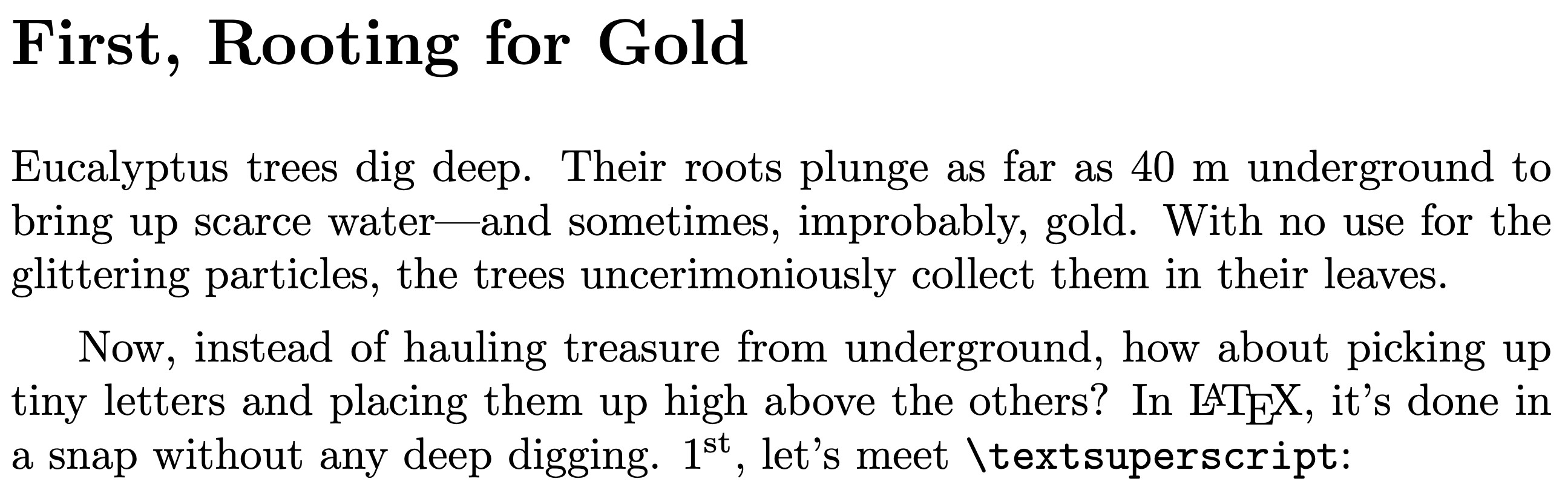
\raise
Now, instead of hauling treasure from underground, how about picking up tiny letters and placing them up high above the others? In \LaTeX, it's done in a snap without any deep digging. 1\raise1ex\hbox{\tiny st}, let's meet \verb/\textsuperscript/:
^ (Exponent)
Now, instead of hauling treasure from underground, how about picking up tiny letters and placing them up high above the others? In \LaTeX, it's done in a snap without any deep digging. 1\smash{\raise4.5ex\hbox{\tiny st}}, let's meet \verb/^/:

$$3^{n^m}$$
(Tested with LaTeX2e and LaTeX3; first published September 2025, last updated August 2026)