

Is it not a pleasure to find something prepared, to open a document already set up for your ideas? With Pages and Keynote, you can gift that joy to others and your future self. Find out here how to use placeholder text in Pages and Keynote to bring order to your templates and jump-start creative process.
First, Let the Sun Portal In
The space in between that so crucially defines things and their relations has a name in Japanese, and a kanji character to boot.
That symbol, ma 間, combines the sun 日 and a door 門. The door is open just wide enough for the light and rays to shine through. Its opening space acts as a portal.
Now, with that in mind — want to leave a portal to open in a document or presentation?
How to Use Placeholder Text in Pages
Time needed: 1 minute
To insert placeholder text in a document using Pages and Keynote for Mac:
- Type the text you want to serve as a placeholder.
- Now highlight the text.
- Select Format | Advanced | Define as Placeholder Text from the menu.
Pages keyboards shortcut: You can also press Command Control Option T, if you want to test your finger agility.
Make it a template: Placeholder text is most useful in document templates you set up in Pages, of course.
Their word: Apple include information on document templates in Pages User Guide.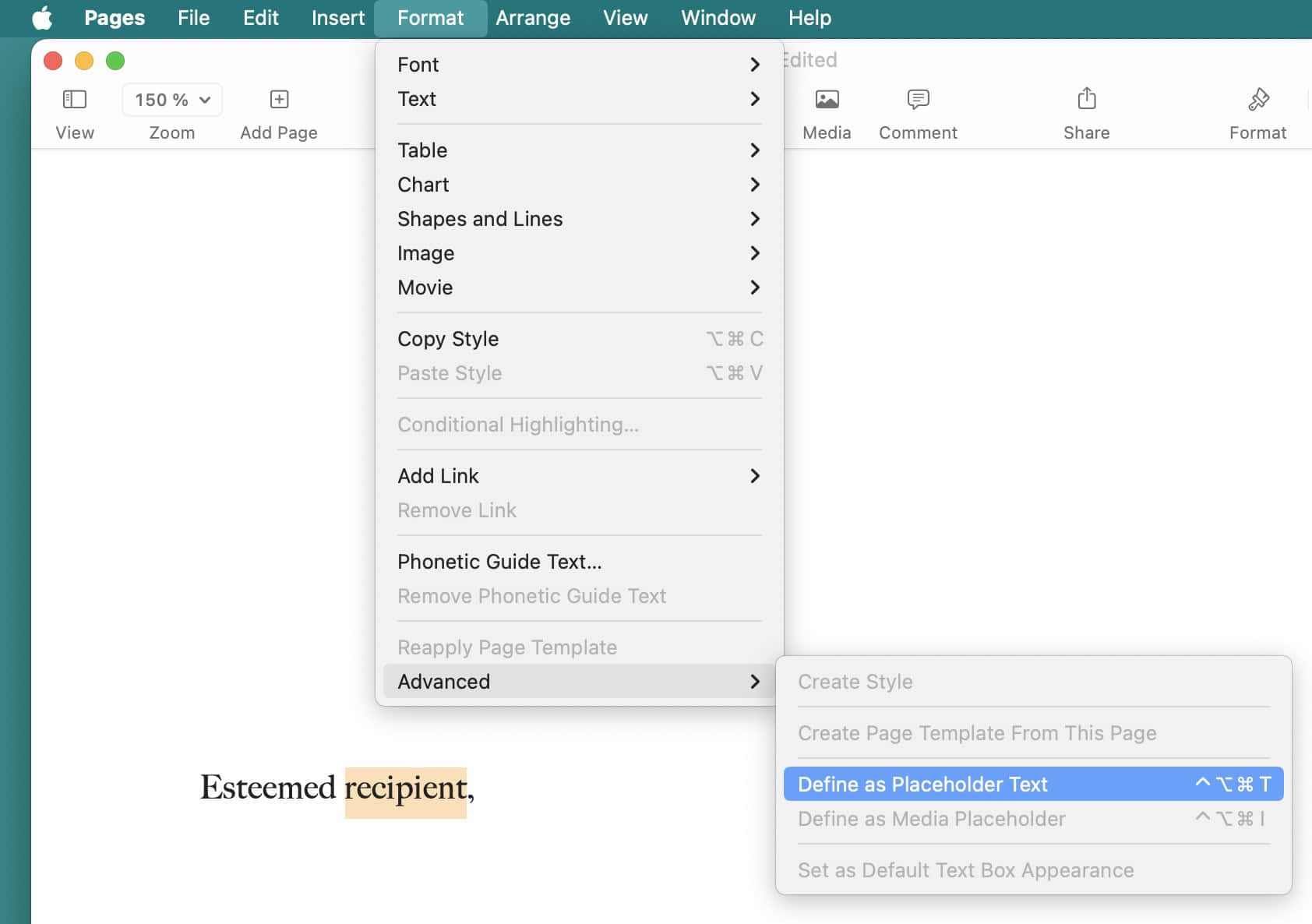
Placeholders in place?
Tips help fuel these email and tech how-tos.
Use Placeholder Text in Keynote
To add placeholder text to a slide layout in Keynote for Mac:
- Select View | Edit Slide Layouts from the menu.
Keynote keyboard shortcut: You can also press Command Shift E to open the layout editor.
“Format” panel: As an alternative, open the Format panel and click Edit Slide Layout. - Highlight or add the text box you want to use as a placeholder.
Boxed in: The placeholder designation always applies to the whole textbox; you cannot make just part of a text field a placeholder.
Layout elements: The fixed elements across layouts (Title, Body, Slide Number and Object Placeholder) are always placeholders; to change the text displayed, highlight the field, and type in the Display: field on the Format | Style panel. - Open the Format pane.
- Go to Style.
- Check Define as Text Placeholder.
- Type the text you want to display as the placeholder under Display.

(You can get a similar poster designed by Lars Gustafsson with that placeholder text — or download a PDF or Keynote document right here.)
How to Use Placeholder Text in Pages and Keynote: FAQ
Can I create placeholder text in Pages and Keynote for iPhone, iPad or iCloud?
No.
While you cannot set up new placeholder text in Pages for iOS, iPadOS and Pages at iCloud.com, you can, of course, replace text you have set up to be a placeholder.
You can edit slide layout in Keynote for iPhone and iPad, but you cannot change the placeholder text for fields (only insert custom text).
Can I add placeholder text in Numbers for Mac?
Yes, with limitations.
While you cannot turn text (or, for that matter, numbers) inside tables or charts into placeholder text, you can add text fields that contain placeholder text.
(Tested with Pages for macOS 14.0–14.4; first published June 2024, last updated November 2025)