

Looking to give a range of numbers in a typographically correct manner or trying to intercept your sentence — which will go on — with an interjection? Find out here how to insert and use en dash (–) and em dash ( — ) in LaTeX ⤓ documents.
First, I Really Like Washing
I really like washing machines!
Busily indulging in my swabbing hobby, I shall leave you to wonder whether that above is a garden-path sentence stopped short, a crash blossom blooming or another kind of sentence ambiguity.
Maybe a hyphen of some sort could help?
How to Insert En Dash (–) and Em Dash ( — ) in LaTeX
Time needed: 1 minute
To insert en dash (–) and em dash ( — ) in documents using LaTeX:
- Use
\textemdashin text mode to insert an em dash ( — ).Alternative: You can use
---(three dashes without whitespace) to stand in for\textemdash.
Here’s where: Em dashes are used most prominently to interrupt trains of thought, e.g., in direct speech or for interjections. - Insert
\textendashto enter an en dash (–) in text mode.Alternative: You can also use
--(two dashes not separated by whitespace).
Here’s where: Use en dashes to give ranges of numbers, e.g., See pages 5–7.
Em-dashing off into the sunset —
Tips help fuel these email and tech how-tos.
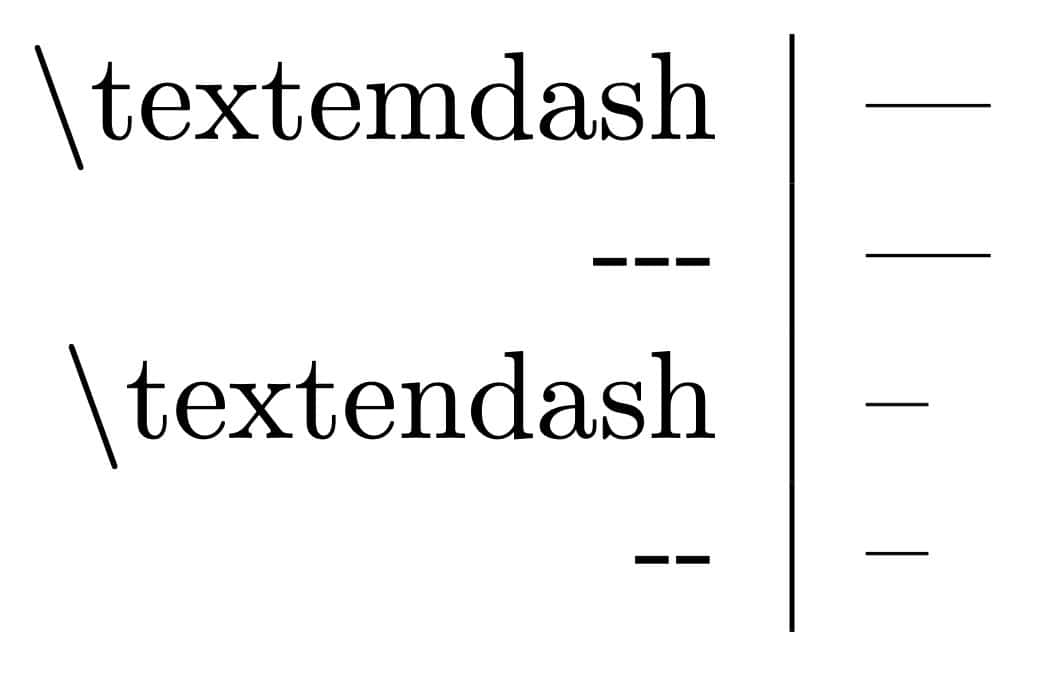
En Dash and Em Dash Example
\begin{tabular}{rl}
	\textbackslash{}textemdash: & \textemdash \\
	-{}-{}-: & --- \\
	\textbackslash{}textendash: & \textendash \\
	-{}-: & -- \\
\end{tabular}
This example produces the following output:
More punctuation: How to Insert a Vertical Ellipsis in LaTeX
How to Insert En Dash (–) and Em Dash ( — ) in LaTeX: FAQ
Can I insert dashes in equations with LaTeX?
Yes.
While the LaTeX math environment does not offer access to en dash and em dash directly, you can switch to text just for these symbols, of course, using \text or \textnormal, on the rare occasion that they are useful.
Example
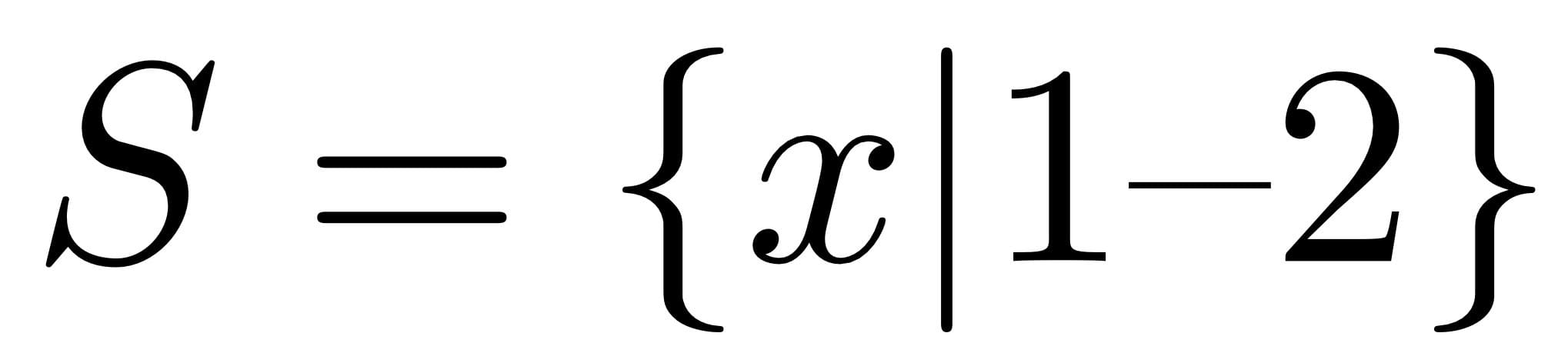
For a largely fictitious example,
$$S = \{x | 1\textnormal{--}2\}$$will produce the following output:
Can I produce longer dashes in LaTeX?
Yes.
LaTeX lets you produce dashes of arbitrary length, say two- or three-em dashes.
To insert a dash of custom length in text using LaTeX:
- Use
\rule[height]{length}{thickness}where you wish to place the hyphen.
Here’s why: The\rulecommand produces a line of the desired length at the desired location — which can be right inside text.
Example:\rule[0.2em]{2em}{0.5pt}will produce a line of 2 em length with thickness of 0.5pt (which should correspond to the thickness of a dash) 0.2 em up from the baseline.
Can I use LaTeX em and en dashes in Word math mode?
No.
The LaTeX commands for ‘–’ and ‘ — ’ do not work when you enter equations in Word, not even when you format the equation as LaTeX. You can always use Word’s own ways of inserting dashes.
Can I use LaTeX dash in Pages?
No.
The LaTeX environment in Pages does not interpret the LaTeX commands for en and em dashes correctly. You can insert the dash symbols using the standard Mac methods, of course.
(First published October 2024, last updated February 2026)