

Looking to add three vertical dots — a vertical ellipsis or ‘⋮’ — In your LaTeX document? You can use the horizontal dots in a matrix, of course, or for a representation of the three-dots menu. Find out here how to insert vertical dots as an ellipsis ( ⋮ ) in LaTeX ⤓.
On This Page
How to Insert Three Vertical Dots (Ellipsis ⋮ ) in LaTeX
⚡ Quick Fix
Use \vdots for ‘⋮’ in LaTeX.
Time needed: 2 minutes
To use a vertical ellipsis (three vertical dots) in a LaTeX document:
- Go to the position in your document where the vertical ellipsis should appear.
Here’s where: In normal text, you will hardly use a vertical ellipsis except as a special character; treat it mostly like a word of its own.
Whitespace: If you want to surround the ellipsis with whitespace, you can use\hspace{}, of course. - Use
\vdotsto insert the vertical ellipsis.Math mode: The
\vdotscommand works just as well in math mode; for more math dots, see below.
Also just text: How to Make a Three-Dots Menu Button in Unicode
How to Insert a Vertical Ellipsis in LaTeX: Example
Open the three-dots \emph{menu} button (\hspace{0.2em}\raisebox{-.4ex}{\textbf{\vdots}}\hspace{0.2em}).This will display as the following:

All dots ⋮ lining up?
Tips help fuel these email and tech how-tos.
Insert Horizontal and Diagonal Ellipses in LaTeX
To insert ellipses as well as three horizontal and diagonal dots in LaTeX
| Ellipsis | Text Mode | Math Mode |
|---|---|---|
| … | \ldots\textellipsis | \ldots\mathellipsis |
| ⋯ | \cdots | \cdots |
| ⋱ | \ddots | \ddots |
| ⋰ | \udots (MnSymbol) | \iddots (mathdots)\udots (MnSymbol) |
Dots Example in LaTeX Math Mode
\usepackage{amsmath}
[…]
\begin{math}
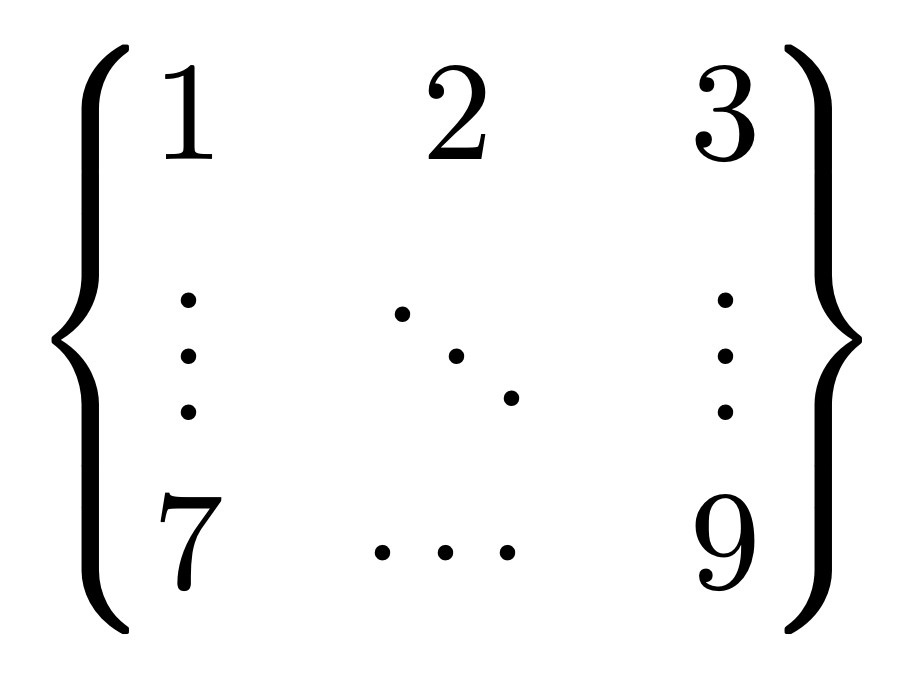
  \begin{Bmatrix}
    1 & 2 & 3\\
    \vdots & \ddots & \vdots\\
    7 & \cdots & 9
  \end{Bmatrix}
\end{math}
This results in the following output using amsmath (with \begin{Bmatrix} and \end{Bmatrix} for setting up a matrix:
(Tested with LaTeX 2e; first published October 2024, last updated October 2026)