Need to type French guillemet quotation marks (« ») on your Mac? macOS lets you enter single and double guillemets directly using the keyboard for French, Swiss French and other languages that use angle quotation marks. Find out here how to insert French guillemets «» and ‹› on a Mac ⤓, as well as the narrow non-breaking spaces that traditionally accompany them.
On This Page
How to Type French Guillemet Quotation Marks (« ») on a Mac
⚡ Quick Fix
Type Option \ for « and Option Shift \ for ».
Type Option Shift 3 for ‹ and Option Shift 4 for ›.
Guillemets incl. narrow whitespace:
Using a US-English Keyboard to Insert French Quotation Marks
Time needed: 1 minute
To insert guillemets (the French quotation marks ‘«’ and ‘»’) directly using the keyboard on a Mac:
- Position the text cursor where you want to insert the opening or closing guillemet quotation mark.
Here’s where: In French, the pair of guillemets encloses the quoted text with tips pointing outwards; the quotation marks are separated from the quotation with a narrow non-breaking space; in Switzerland and most other languages that use guillemets, the narrow space is omitted.
- Press Option \ (backslash) to type the opening guillemet
«and Option Shift \ to insert the closing».
- Use Option Shift 3 to insert the opening single guillemet
‹and Option Shift 4 for the closing›.Here’s why: Use single guillemet quotation marks for nested quotations, for example.
We can « » you on that now?
Tips help fuel these email and tech how-tos.
Inserting Guillemets with a French (AZERTY) Keyboard Layout
To type guillemet quotation marks using a French AZERTY keyboard layout:
- Press Option É for
«and Option Shift É for».
Typing Guillemets with a Swiss (QWERTZ) Keyboard Layout
To insert French quotation marks using a Swiss French or Swiss German QWERTZ keyboard layout:
- Press Option , (comma) for
«and Option Shift , for».
Using Keyboard Viewer or Emoji Panel
To insert the single or double guillemet quotes using the macOS emoji panel or Character Viewer:
- Position the text cursor where you want to insert the quotation mark.
- Open the emoji panel or Keyboard Viewer.
Here’s how: Select Edit | Emoji & Symbols from the macOS menu, for example.
Mac keyboard shortcut: You can also press Fn E or Command Control Space to bring up either. - Click the Search field.
- Type
angle quotation mark. - Double-click the desired single or double angle quotation mark in search results.
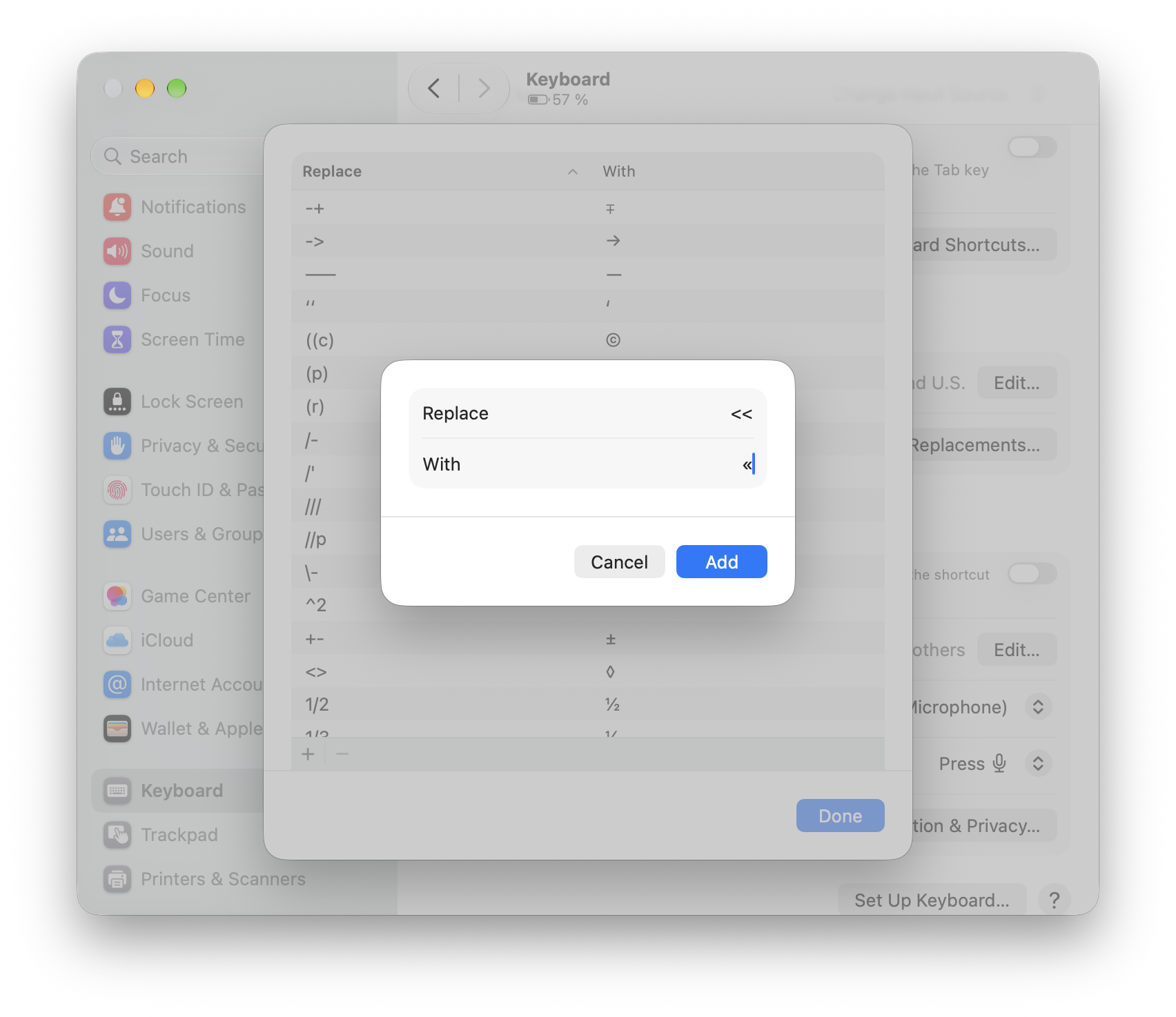
Using Text Replacement to Insert French Quotation Marks
To set up a text replacement for inserting French quotation marks:
- Open System Settings on the Mac.
Here’s how: Select | System Settings… from the menu. - Go to the Keyboard section.
- Click Text Replacements… under Text Input.
- Choose + to add a new text replacement.
- Type the character sequence you want to be replaced with the French angle quotation marks under Replace.
Example: You can use<<for the opening Guillemet. - Type or paste the French quotation mark to be inserted under With.
- Click Add.
Copy and Paste the French Guillemet Quotation Marks
Double angle left-pointing quotation mark « | |
Double angle right-pointing quotation mark » |
Double angle left quotation mark incl. space « | |
Double angle right quotation mark incl. space » |
Single angle left-pointing quotation mark ‹ | |
Single angle right-pointing quotation mark › |
How to Type French Guillemet Quotation Marks (« ») on a Mac: FAQ
Are Guillemets used with the tip pointing out or in?
The direction of the French quotation marks depends on regional use.
In France and Switzerland as well as in Arabic, Italian, Greek and Norwegian (and traditional usage in most other languages that include the symbols in writing), guillemets point outward.
If guillemets are employed in German, Hungarian, Czech and a number of other languages, they typically point inwards.
(Tested with macOS Golden Gate 27; first published October 2026)