

Discussing Fußball with a German friend or looking for a genuinely Austrian recipe for süße pancakes? While the Eszett (ß) may be nowhere in sight on your keyboard, Linux offers more than one clever way to add the character. Find out here how to type a German sharp S (ß) on Linux ⤓ easily using the keyboard, a character picker, the “Compose” key or Unicode.
First, Heat to Beat the Heat
When a German diesel multiple unit car of class 628.4 abruptly stopped outside a station in early summer, that was not the best of signs.
When, adding to the heat of June or July, the heating system switched on at full throttle — that was not the worst of signs. The engineer just knew about the train’s quirks.
Typically, pollen and perhaps insects might have clogged the air vents, causing the motor to overheat. A “heating test cycle” then effectively transferred the motor heat to the passenger compartment. The passengers would sweat, but the car could limp to the next station.
Now, to discuss this properly with German trainspotters, you’ll need the word for hot: heiß. Let’s find out how to produce that mysterious sharp S without breaking a sweat:
How to Type a German Sharp S (ß) on Linux
Using the US-English International Keyboard Layout for ‘ß’ (Fastest)
Time needed: 1 minute
To insert the German sharp S (ß) character on Linux:
- Add and switch to the US-International keyboard layout.
- Position the text cursor where you want to type the sharp s (or Eszett).
- Press AltGr S (or right Alt S) to insert ‘ß’.
Uppercase ‘ẞ’: The US-International keyboard layout does not include a key combination for the uppercase sharp S; you can use a character map or Unicode input to insert that character or replace it with “SZ” or the lowercase character ‘ß’.
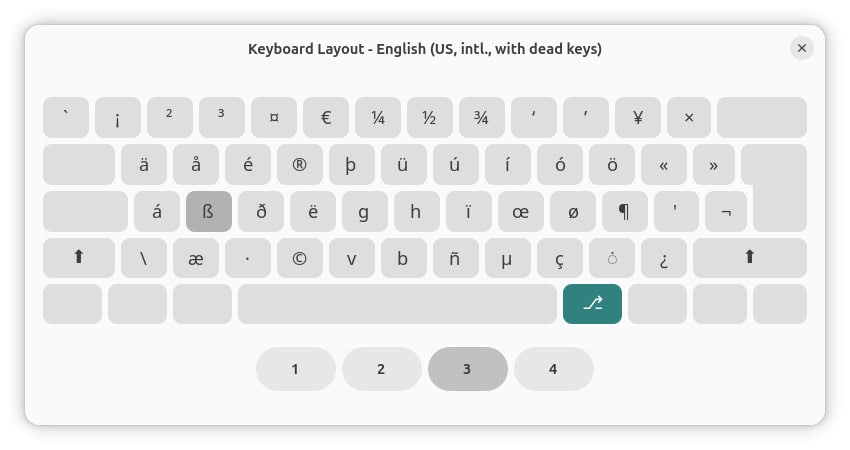
Fußball > Foosball?
Tips help fuel these email and tech how-tos.
Using a Character Map (Upper- and Lowercase ß)
To use a Linux character map to copy lowercase ß or uppercase ẞ for inserting anywhere:
- Open Characters (Gnome) or kCharSelect (KDE).
- Type
latin sharp s.
Here’s why: This search returns only the German sharp s characters; you can also search for “sharp s”, of course, and ignore the musical sharp signs that also might show up in results. - Select and copy the desired character for pasting.
Their word: Gnome include informaiton on inserting special characters in Gnome help.
On Windows? How to Type Sharp S (ß) on a Windows Keyboard
Using the Linux “Compose” Key to Insert Sharp S (ß or ẞ)
To input the German character sharp s (ß) using the Linux Compose key and a character sequence:
- Configure Compose key support for Linux on your machine.
- Position the text cursor where you want to input the character ‘ß’ or ‘ẞ’.
- Press Compose.
- Now type
ssfor (lowercase) ß orSSfor (uppercase) ẞ.
Here’s what happens: The doubled character will be replaced with the respective sharp s.
How to Type a German Sharp S (ß) on Linux: FAQ
Can I use Unicode to insert the sharp S characters?
Yes.
To use direct Unicode input to insert German sharp S:
- Press Ctrl Shift U.
- Type
00DFfor lowercase ‘ß’ or1E9Efor uppercase ‘ẞ’. - Now press Enter.

Can I also just copy the characters for pasting?
Yes, of course.
Use the table below to copy the German sharp S characters for pasting anywhere in Linux:
lowercase sharp s ß | |
uppercase sharp s ẞ |
(Tested with Gnome 49 and KDE 6; first published February 2026)