

Tired of (and by) your cursor incessantly blinking in Windows? Wish to write, prompt and code in a more focused and less distracted manner? Find out here how to turn off cursor blinking in Windows.
On This Page
How to Turn Off Cursor Blinking in Windows
Time needed: 3 minutes
To disable cursor blinking on Windows 10 and Windows 11 (and have the text cursor display continuously):
- Open Windows settings.
Here‘s how: Open the Start menu and open the Settings application.
Windows keyboard shortcut: You can also press Windows I to open the Settings app directly. - Type
blink rateover Find a setting in the search field.Here’s why: Do not bother finding the option in Windows 11 settings using its menus; the option is available only in Control Panel, but there, too, you need to search.
- Select Change cursor blink rate from the auto-complete suggestions.
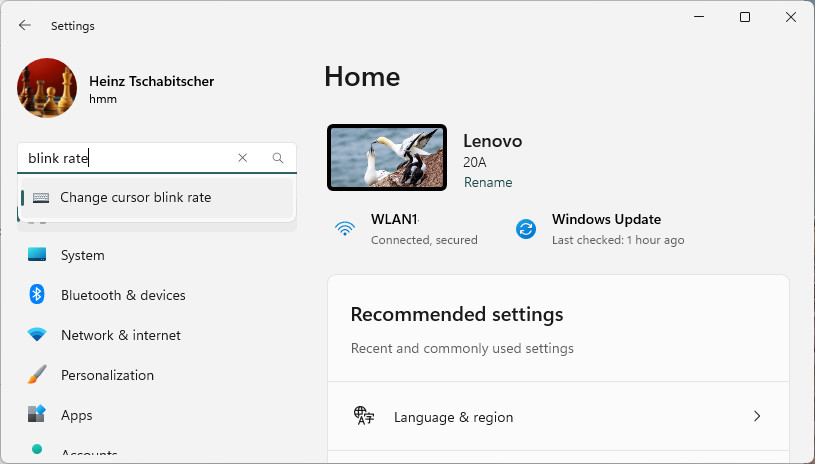
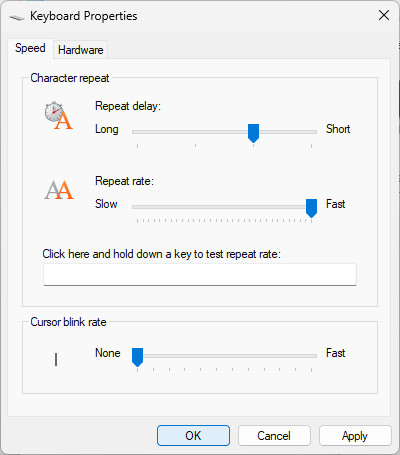
- Set Cursor blink rate to None on the Speed tab of Keyboard Properties.
Direct access: To open Keyboard Properties directly, press Windows R, type
control main.cpl keyboardand click OK. - Click OK.
Achieved cursor bliss?
Tips help fuel these email and tech how-tos.
How to Turn Off Cursor Blinking in Windows: FAQ
Will disabling blinking in Windows also disable blinking in CMD.EXE and PowerShell?
Yes.
If you turn off blinking in the Windows graphical user interface, this will also apply to Windows terminals such as the command prompt and PowerShell.
On a Mac? How to Turn Off Cursor Blinking on macOS
Will this disable cursor blinking in all applications (e.g., Visual Studio Code or Vim)?
No.
Some editors, of course, stay true to their own cursor settings. You can often disable blinking in the respective settings, of course:
- Emacs: How to Disable Cursor Blinking in Emacs
- Visual Studio Code: How to Disable Cursor Blinking in Visual Studio Code
(Tested with Windows 11 Version 24H2–25H2; first published April 2025, last updated July 2026)