

Clicked on an email address, and the wrong email program opened up — again? Tired of Apple Mail and eager for your favorite app to take on email duties instead? Find out here how to change and set the default mail app (email client) on a Mac ⤓.
On This Page
How to Change the Default Email Client on a Mac
Time needed: 3 minutes
To set the default email program on a Mac using macOS:
- Open Mail.
Here’s how: Press Command Space to bring up Spotlight, for example, start typing
mailand select Mail (Application); as an alternative, use Launchpad, of course.
Keyboard shortcut: You can also set up a keyboard shortcut for opening Mail on macOS. - Select Mail | Preferences… from the menu.
Mac keyboard shortcut: You can also press Command , to open Mail preferences.
- Go to the General tab.
- Select the desired email program under Default email reader:.
Missing email app: If the program you want to use for email is not in the list, you can choose Select…, find and double-click the program to add it to the list.
Example: Choose Select…, highlight Mailbird in the Applications folder and click Select to use Mailbird for Mac as the default.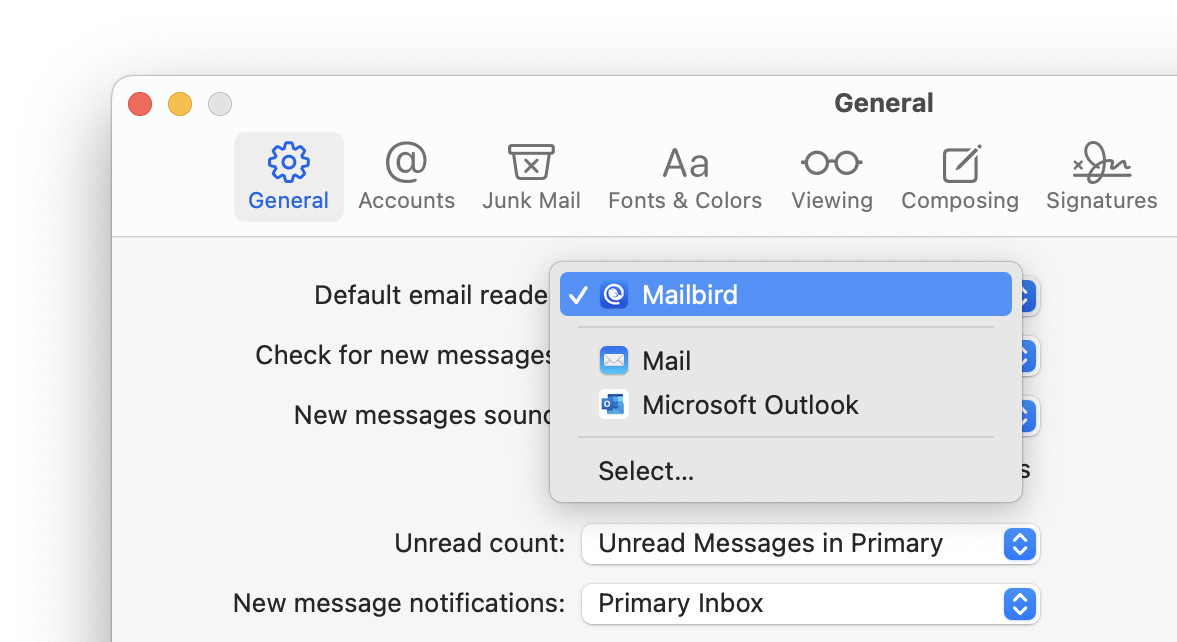
- Close the General Mail preferences window.
Mozilla: You can set up the Firefox browser to use a different default email program.
Example: Using these steps, you can make Outlook the default email program on your Mac, for instance.
Their word: Apple include information on changing default apps in a support article.
Sent Apple mail packing?
Tips help fuel these email and tech how-tos.
How to Change the Default Email Client on a Mac: FAQ
When will the default email reader be used?
Primarily, macOS uses the default email program for creating new messages,
- when you click on an email address or message link (mailto:) or
- when you share an item (such as a web page, for instance) by email.
Default browser: How to Make Google Chrome the Default Browser
Can I make a web-based email service my default mail “app”?
Yes, unter certain circumstances.
If the web-based email service can be turned into a Chrome App, you can also make it the default email program on a Mac. This works for Outlook.com (Outlook on the Web), for instance.
You can also selectively make the service the default email program in Google Chrome.
(Tested using Apple Mail 15–17 on macOS Tahoe 26.0–26.4, Sequoia 15.0–15.3, Sonoma 14.0–14.3, Ventura 13.3, Monterey 13.2, Big Sur 11.2, Mojave 10.14 and Catalina 10.15; first published October 2018, last updated May 2026)