

Looking to clear out a Yahoo Mail folder — to delete everything or mark all emails as read, including the messages buried hundreds deep? You don’t have to tap or click your way through individual emails. Find out here how to select all messages in a Yahoo Mail folder ⤓ using a checkbox, a keyboard shortcut or the Yahoo Mail app.
On This Page
How to Select All Messages in a Yahoo Mail Folder
⚡ Quick Fix
Open the folder and click the checkbox above the message list, then choose Select all __ messages in __ if it appears.
Yahoo Mail in a Desktop Browser
Time needed: 2 minutes
To select all emails in a folder with Yahoo Mail using a desktop browser:
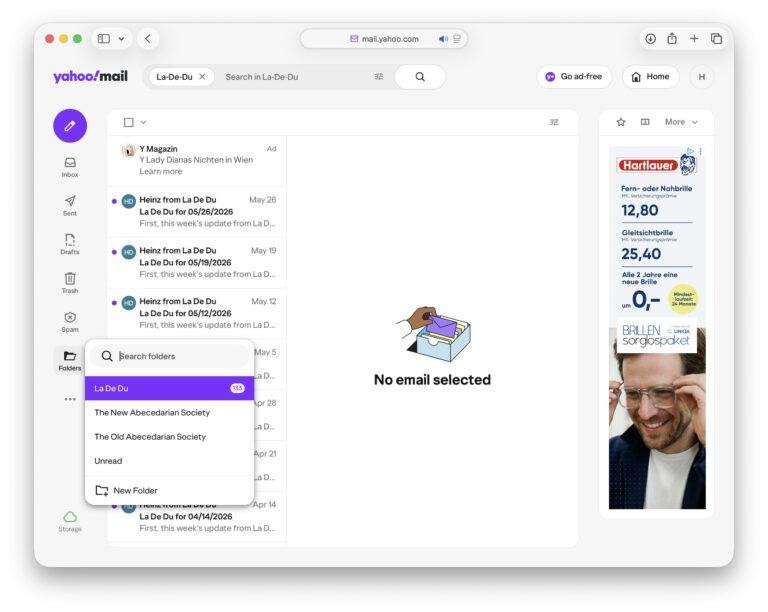
- Go to the Yahoo Mail folder that holds the messages you want to work on in bulk.
Here’s how: Click Folders in the Yahoo Mail sidebar, then pick the folder you want to open.
- Click the Select all messages checkbox at the top of the message list.
Yahoo Mail keyboard shortcut: Press Ctrl A (Windows and Linux) or Command A (Mac) to check the box.
Here’s what happens: This selects all messages currently visible in the list — 40–100 emails initially. - Now click Select all {count} messages in {folder name} if it appears at the top.
Here’s why: This selects all messages in the folder, including messages not currently shown in the list.
Keyboard shortcut: Press Ctrl A or Command A again to progress to selecting all emails in the folder.
“Old” Yahoo Mail: In old Yahoo Mail, you will only see the Select all __ messages bar if you use the mouse to select all; using the keyboard shortcut only selects all visible emails.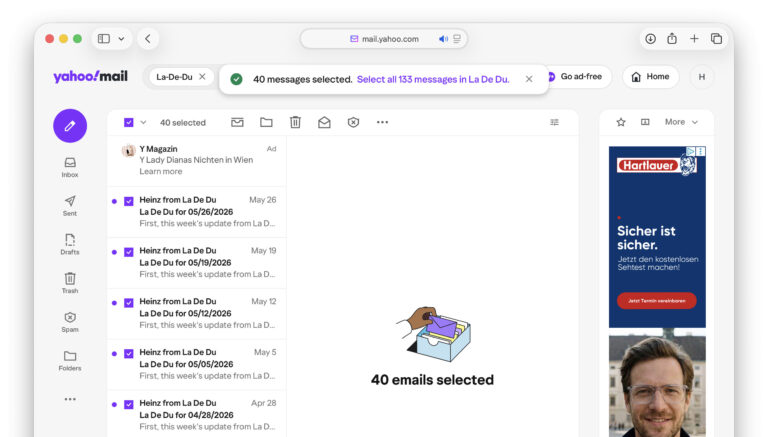
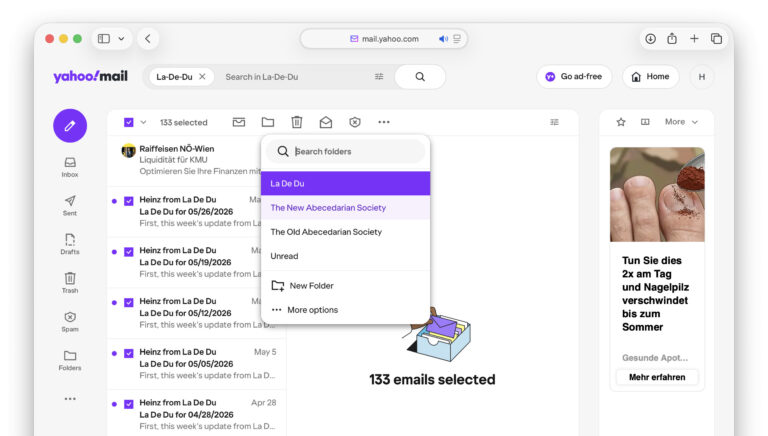
- Act on the selected messages.
Examples: Press D to pick a folder for moving them, Del to trash them and Shift K to mark all read.
Commanding them all?
Tips help fuel these email and tech how-tos.
Select All Emails in a Folder with the Yahoo Mail App
To select all messages in a folder using the Yahoo Mail app for iPhone:
- Go to the folder.
Here’s how: Tap the folder button in the bottom toolbar, then select the folder you’d like to open. - Select any email.
Here’s how: You can tap the avatar in front of any email in the folder or tap the selection circle at the top. - Now tap Select all at the top.
Here’s what happens: All emails in the folder — visible or not — will be checked.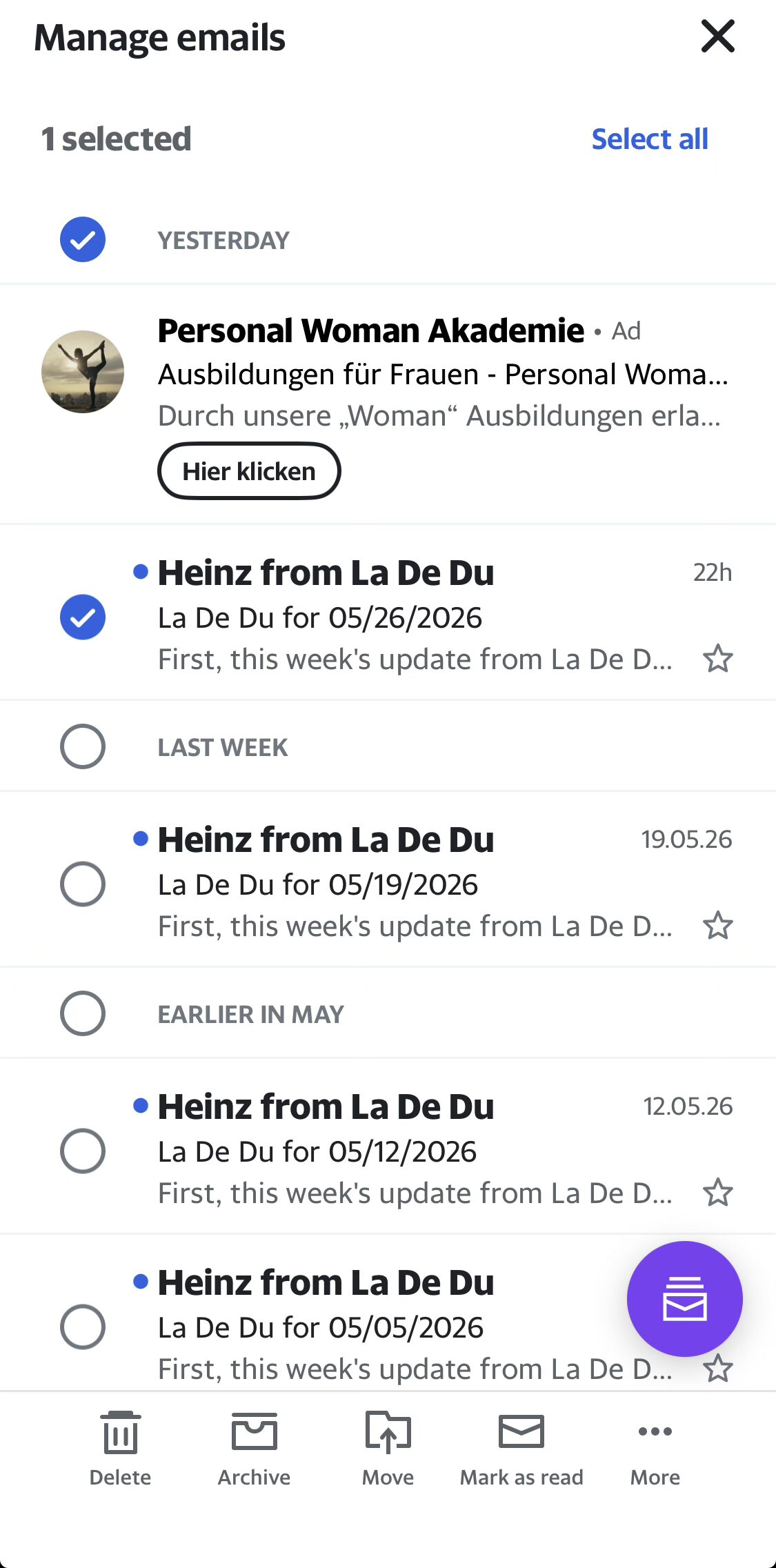
Emptied a folder? How to Delete Folders in Yahoo Mail
Moving between tabs, not folders: How to Move an Email to a Different Yahoo Mail Inbox Tab
How to Select All Messages in a Yahoo Mail Folder: FAQ
How many emails can Yahoo Mail select at once in a folder?
All of them.
There is no hard limit to the number of messages you can select in a folder. You can select all emails in the folder, even if that means thousands of messages.
Acting on tens of thousands of emails will take time though, may stall and might eventually fail if the action times out on the backend.
Why won’t the “Select all __ messages” appear?
The message to select all messages including those not currently displayed does not appear if
- all emails in the folder are already shown and selected or if
- you use the keyboard shortcut to select all in “Old” Yahoo Mail.
Does selecting all emails in a folder also select messages in sub-folders?
No.
Selecting all only affects the currently open folder, not any folders below it. To act on all emails in a folder hierarchy, open each folder individually and repeat the selection process.
Can I select only unread messages?
Yes, with a twist.
You can apply a filter — such as showing only unread emails — before selecting all messages. Selecting all messages in the folder using the Select all __ messages message will still select all emails in the folder, though, including those filtered out.
To select all unread messages in a Yahoo Mail folder:
- Open the folder
- Filter for unread emails.
Here’s how: Click Preference at the top of the message list and turn on Unread. - Scroll to the bottom of the list until all unread emails in the folder are visible.
- Use the Select all checkbox or press Command A/Ctrl A.
(Tested with Yahoo Mail in a desktop browser and Yahoo Mail 26.22; first published May 2026)