

Already spent more time hunting the elusive π on your Windows keyboard than calculating with it? The symbol may be hidden — but it is not without reach! Find out here how to insert the symbol for pi (π) on Windows ⤓ using emoji panel, Character Map and quick copy/paste.
First, Drum Roll Please!
Trash collection may well come with a drum roll.
For a truck with a rolling cylinder can usually hold more trash than the same truck without the drum and roll. Just like shaking a cereal box helps even things out, trash is better distributed in the moving cylinder — and automatically compacted to boot.
Now, circumambulatorily compacted or cointossingly chaotic, what’s the volume of that cylinder? Either way, we’ll need pi to compute :
How to Type the Pi Symbol ( π ) on a Windows PC
Using the Emoji Panel (Fast and Easy)
Time needed: 2 minutes
To input the symbol for pi ( π ) using the emoji panel on Windows:
- Position the text cursor where you want to insert the symbol for pi.
Here’s where: If pi stands in for the number 3.14159…, use it like you would use the number; typically, surround it with whitespace in text but not necessarily in formulae.
- Open the Windows emoji keyboard.
Here’s how: Press Windows . (period), for instance.
- Go to the %⟳△+ (Symbols) tab.
- Scroll all the way down (or right) to Language symbols.
- Click π to insert the lowercase Greek letter pi.
Higher case: For the uppercase letter pi, click ∏.
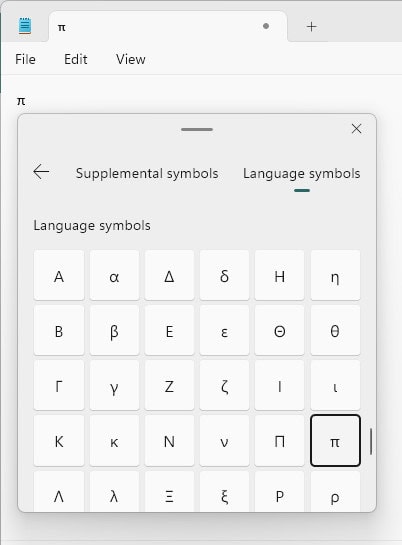
Piece of 𝞹?
Tips help fuel these email and tech how-tos.
Using Character Map to Find Pi (Cumbersome but Universal)
To input the letter pi with the Windows Character Map:
- Launch Character Map.
Here’s how: Press Windows, for instance, to open the Start menu, start typingcharacter mapand select the Character Map application. - Type
"letter pi"under Search for :.
Quotation marks: Do include the equation marks to exclude superfluous results.
No “Search for :”: If you do not see the search field, check Advanced view. - Click Search.
- Now double-click the desired letter π or ∏ to insert it into the Characters to copy : field.
No pi. If you do not find a symbol for pi at all, try a different typeface (e.g., Lucida Sans Unicode). - Click Copy.
- Paste the symbol for pi where desired.
Their word: Microsoft include information on Character Map in Windows help.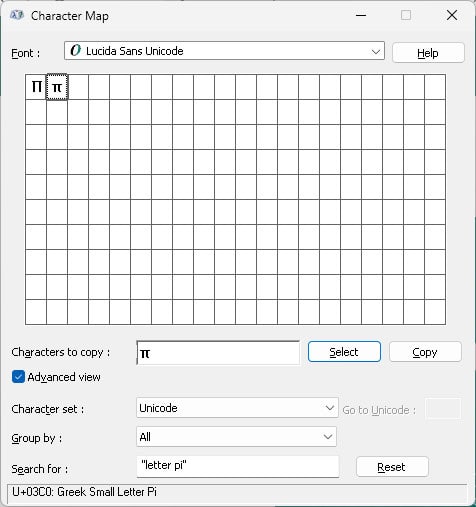
Using Copy and Paste to Insert π (Many Styles)
In addition to the methods above (and for inserting the mathematical symbols in particular), you can also copy the symbols for pi using the table below.
lowercase symbol pi π | |
uppercase symbol pi ∏ |
mathematical bold lowercase pi 𝛑 | |
mathematical bold uppercase pi 𝚷 | |
mathematical italic lowercase pi 𝜋 | |
mathematical italic uppercase pi 𝛱 | |
mathematical bold italic lowercase pi 𝝅 | |
mathematical bold italic uppercase pi 𝜫 | |
mathematical sans-serif bold lowercase pi 𝝿 | |
mathematical sans-serif bold uppercase pi 𝝥 | |
mathematical sans-serif bold italic lowercase pi 𝞹 | |
mathematical sans-serif bold italic uppercase pi 𝞟 | |
double-struck lowercase pi ℼ | |
mathematical sans-serif bold italic uppercase pi ℿ |
What’s that π? How to View No-Print Characters and Unicode Code Points
How to Insert the Pi Symbol (π) on Windows: FAQ
Can I type the pi symbol using the Windows US-Internal keyboard layout?
No.
Neither the US-English nor the US-International keyboard layout contains a shortcut for ‘π’.
Can I insert π or ∏ using a Windows “Alt”-code?
No.
Windows does not include “Alt”-codes for inputting the symbols for pi.
Which language is the origin for the symbol for pi?
The letter ‘π’ is part of the Ancient Greek alphabet. Incidentally, it is the first letter of the Greek word for perimeter — περίμετρος.
The use of ‘π’ for the relationship of a circle’s circumference to its diameter was popularized by the influential mathematician Leonhard Euler, though he was not the first to use the symbol in that manner. That distinction might be William Jones’s.
(Tested with Windows 11 Version 23H2–25H2; first published October 2024, last updated March 2026)