

You’re trying to invoice a British client or just moved to Ipswich and your Linux keyboard is stubbornly refusing to produce the pound sign ( £ )? Find out here how to effortlessly enter the pound sterling symbol on Linux using key combinations, the “Compose” key or good old copy/paste — all without switching keyboards.
First, a Buck for Every Kitten
Rabbits are known for their thumping feet, sudden changes in direction — and, oddly enough, their offspring called kits or kittens. Meanwhile, mother and father rabbit go by doe and buck. Well, so it goes.
Speaking of bucks: pounds — originally libra in Latin — measure not just weight, of course, but also money. The ‘£’ symbol, with its charmingly cute curl, stands for the British pound sterling. On Linux, typing it is simple: just three fingers and one key combination (or two fingers if you’re British) are all you need.
How to Enter the Pound Sign ( £ ) on Linux
Using the Keyboard to Type £ on Linux
Time needed: 1 minute
To type the currency symbol for the pound ( £ ) on Linux:
- Position the text cursor where you want to insert the symbol for pound.
Here’s where: Place the pound sign in front of the numerical amount, separated by a (ideally narrow) non-breaking space or no whitespace at all.
- Add and switch to the US-English International keyboard layout.
Here’s why: The regular US-English keyboard layout does not include a shortcut for the ‘£’ symbol.
Other layouts: You can also use the Macintosh English keyboard layout or the UK-English layout. of course. - Press AltGr Shift 4 (or Right Alt Shift 4).
Mac-English: Using the Macintosh layout, press AltGr 3 (or Right Alt 3)
UK-English: With the UK-English keyboard layout, press Shift 3 to insert the pound symbol.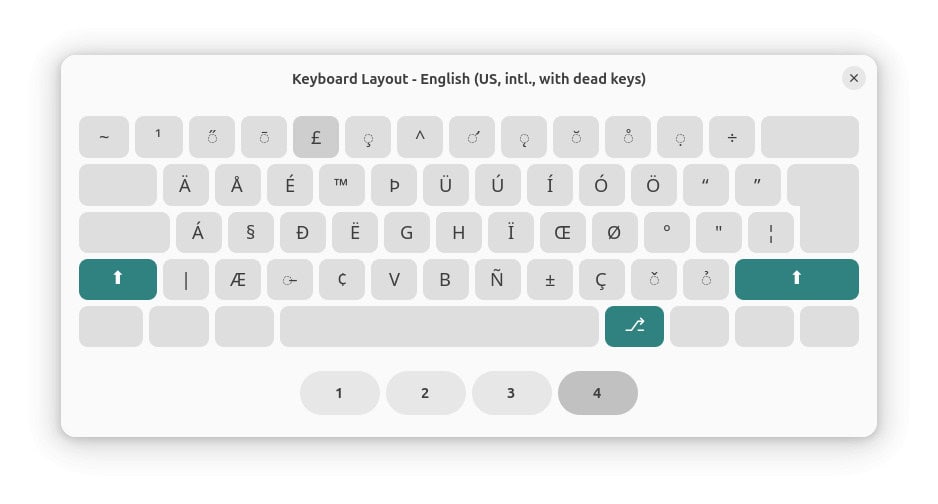
£ the pound key?
Tips help fuel these email and tech how-tos.
Using a Character Picker to Insert the Pound Sign
To find and produce the pound sign using a Linux character picker:
- Open Characters (Gnome) or KCharSelect (KDE).
- Search for
pound. - Copy the ‘£’ symbol in the character picking app.
- Paste the character anywhere on Linux.
Also has a character picker: How to Insert the Pound Currency Symbol ( £ ) on a Mac
On Windows? How to Type the Pound Symbol ( £ ) on a Windows PC
Inserting the Pound Sterling Symbol with the Linux “Compose” Key
To produce the £ symbol for pounds on Linux no matter the keyboard layout using the “Compose” key:
- Specify and enable the “Compose” key for Linux.
- Press Compose.
- Now type
L-(Shift L followed by -, minus).
Shift does not have to happen: You can also typel-instead.
What does happen: The key combination you’ve chosen will be replaced with the (regular-width) pound symbol.
How to Enter the Pound Sign ( £ ) on Linux: FAQ
Can I enter the pound sign directly using Unicode?
Yes.
To use the Unicode code point to insert the pound sign on Linux:
- Position the text cursor where you want to input the ‘£’ sign.
- Press Ctrl Shift U.
- Type
00A3for a (regular-width) pound symbol.
Full-width: For a full-width pound sign, typeFFE1.
- Now press Space or Enter.
Here’s what happens: The Unicode code point is replaced with the respective pound symbol.
Can I also copy and paste the pound sign?
Certainly.
Use the following table to copy the desired pound symbol for pasting anywhere on Linux:
Pound sign £ | |
Full-width pound sign £ |
(Tested with Gnome 48 and KDE Plasma 6; first published June 2025, last updated November 2025)