
Unsure whether a wind speed of “6 bft” should worry you or trying to get used to degrees celsius for a trip to Europe? Wondering whether you can get wind speed in trusted knots and pressure in inHg? Find out here how to change units in Apple Weather on a Mac for temperature (°C/°F) ⤓, distance, pressure, precipitation and more.
On This Page
How to Change Temperature Units in Apple Weather for Mac (℃/℉ and More)
Time needed: 2 minutes
To manually pick the units used for temperature (°C or °F), wind speed, precipitation and more in Apple Weather for Mac:
- Open settings in Weather.
Here’s how: Select Weather | Settings… from the menu.
Mac keyboard shortcut: You can also press Command , (comma) to open Weather settings. - Go to the General tab.
- Choose Celsius (°C) or Fahrenheit (°F) under Temperature.
System settings: You can also choose Use system settings, of course, and have Weather use the macOS-wide region settings for the temperature unit; see below
- Pick the velocity unit for wind speeds under Wind.
Beaufort: If you use the empirical Beaufort scale, wind speeds will be given in bft and gusts in the default speed unit for your region.
- Choose metric (mm, cm) or imperial (in) for Precipitation.
- Pick the Pressure scale you prefer.
- Finally, choose a distance measurement for visibility under Distance.
Unchanged units: Apple Weather always uses relative humidity in percent for humidity and the WHO scale for UV intensity.
Which units: See below for which units to pick.
Their word: Apple include information on customizing units in the Weather User Guide.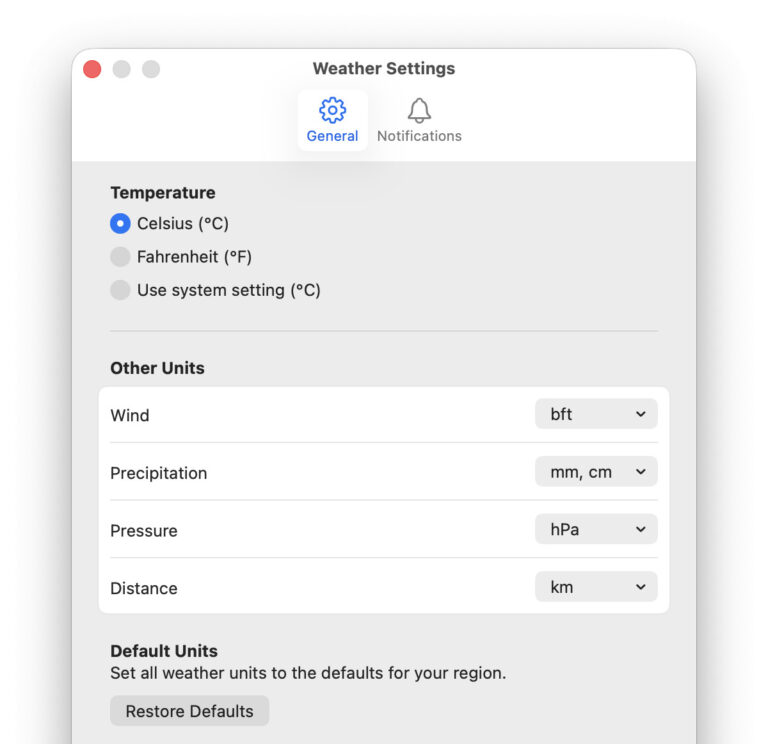
Weather °F or °C?
Tips help fuel these email and tech how-tos.
Quickly Change Temperature Units in Apple Weather
To change from degrees Fahrenheit to Celsius quickly in Apple Weather:
- Select View | Fahrenheit or View | Celsius from the menu.
Keyboard shortcut: Weather does not include a default shortcut for either choice, but you can set up your own keyboard shortcuts, of course.
So many units, so many locations:
How to See Multiple Locations in Apple Weather for Mac
Change System-Wide Mac Temperature Settings
To chose the standard temperature units for macOS:
- Open System Settings.
- Go to the General category.
- Choose Langauge & Region.
- Select Celsius (°C) or Fahrenheit (°F) under Temperature.
Speed and distance: The setting for Measurement system also changes the default values for the respective units in Apple Weather; click Restore Defaults in Apple Weather settings to have it adopt the default values.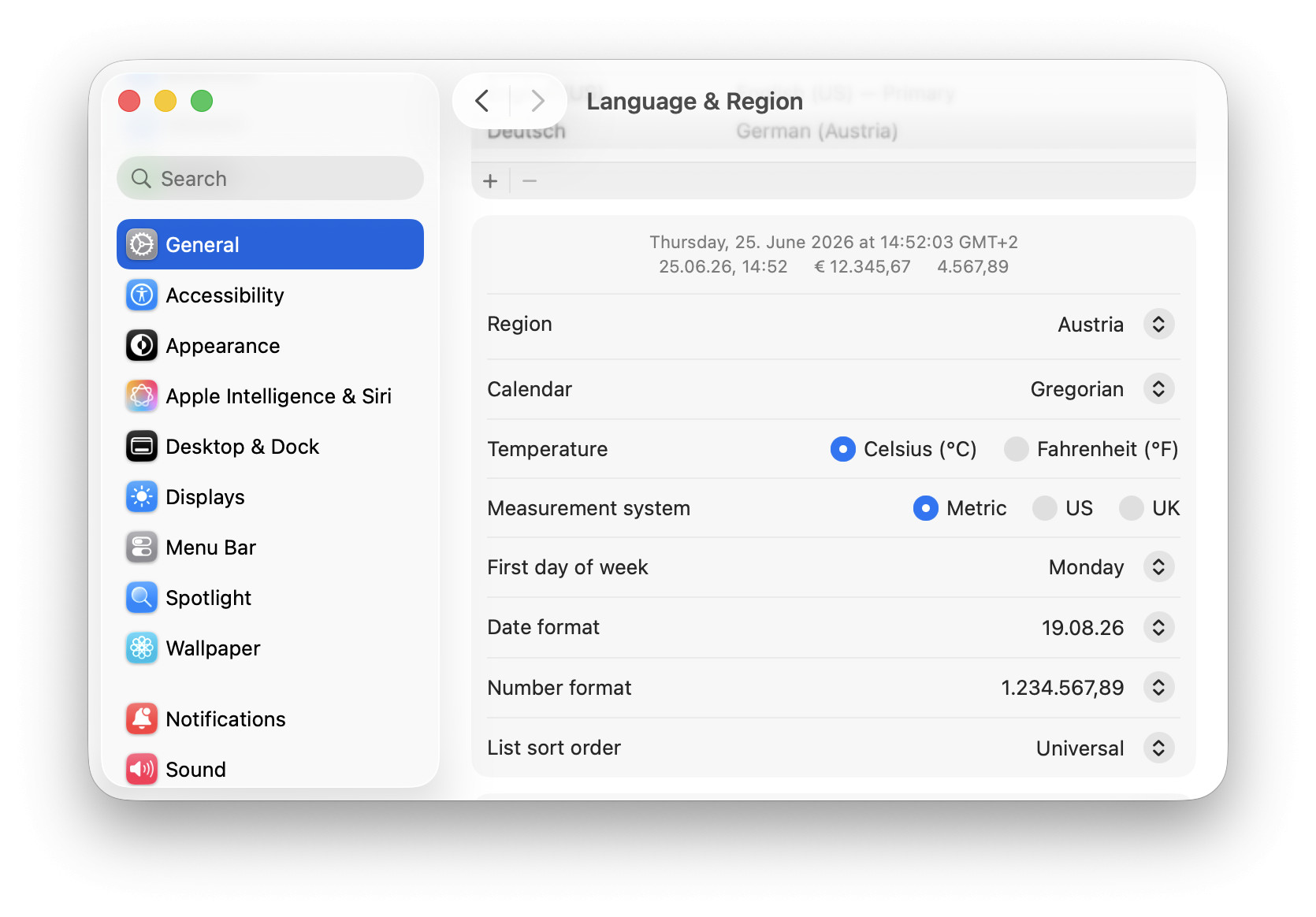
How to Change Temperature Units in Apple Weather for Mac (℃/℉ and More)
Will this also change the units for display in Weather widgets and the menu bar?
Yes.
When you change the units in Apple Weather, the temperature unit for weather in the Mac menu bar and macOS weather widgets also adapts.
What do the wind speed units mean in Apple Weather?
Apple Weather can display wind speeds in five different units. Pick the unit most meaningful to you.
| Unit | Conversion | Typical use |
|---|---|---|
| mph | ≈ 1.6 km/h | U.S. and U.K. road speed |
| km/h | = 1 km/h | Everyday use in Europe |
| m/s | ≈ 3.6 km/h | Physics and engineering |
| bft | approximate ranges | By wind effect, sailing |
| kn | ≈ 1.85 km/h | Aeronautics and shipping |
Wind speeds are usually given 10 m above the ground; at 1–2 m above ground, you can expect as little as 50%–70% of that.
How do the precipitation units work in Apple Weather?
The precipitation units give the height of a water column if you’d collect it (say, in a bucket) over the given time, e.g.
- 2.5 mm for 3 p.m.: between 3 and 4 p.m., rain collected rises to 1.5 mm or
- 0.1 in.
What do the Apple Weather air pressure units mean?
Apple Weather lets you choose, chiefly, between inches of mercury (inHg) and hectopascals (hPa), plus a few variations.
| Unit | Conversion | Typical use |
|---|---|---|
| mbar | = 1 hPa | Historically used in meteorology |
| inHg | ≈ 33.86 hPa | U.S. weather reports and aviation |
| mmHg | ≈ 1.33 hPa | Some scientific contexts |
| hPa | = 1 hPa | Most common unit for weather reports |
| kPa | = 10 hPa | hPa by a factor of 10 |
(Tested with Apple Weather 6.0 on macOS Tahoe 26, first published June 2026)