

Looking to insert the x-bar symbol for statistics homework or a scientific paper? Wondering if there’s a Unicode code point for it or how to construct it? Find out here how to type ‘x bar’ ( 𝑥̅ ) on a Mac using Character Viewer (or just copy x bar for pasting).
First, Not Looking for Something Long and Spiky
You are not looking for something long, thin and spiky in a stack of spiky, long and thin oars of hay when you’ve lost a needle. You are looking for something shiny and brightly metallic that might blink in the sun.
Such is a generally recommended approach to finding what’s lost, hidden and first unseen: establish what makes the object stand out in its environment, then scan for this property alone.
Now, for this to work the rest has to blend into something average… like x bar, the sample mean. Let’s see if looking for the symbol on a Mac keyboard is like searching for that needle:
How to Type x-Bar ( 𝑥̅ ) on a Mac
Using Character Viewer
Time needed: 2 minutes
To insert the x-bar symbol on a Mac:
- Pot the text insertion cursor where the ellipsis should appear.
Here’s where: X bar stands for the sample mean; in floating text, use it like a word on its own, and in a formula like any variable (“We calculated 𝑥̅ for the measured heights to be 5 feet and 5 inches,” for example).
- Bring up Character Viewer.
Here’s how: You can select Edit | Emoji & Symbols from the menu, for example.
Mac keyboard shortcut: To open Character Viewer, press 🌐︎ or Fn E.
Emoji panel: If the emoji panel comes up instead of Character Viewer, scroll to the very bottom (or to the right in the section selector at the bottom), the click the Character Viewer button. - Go to the Math Symbols category.
No “Math Symbols”: You can enable the category using Character Viewer settings.
- Double-click the letter ‘x’ you want to use for x bar.
Here’s which: Choose the typeface and style that fits the formatting around the x bar; generally, serif italics (such as Mathematical italic small x) have been employed for variables.
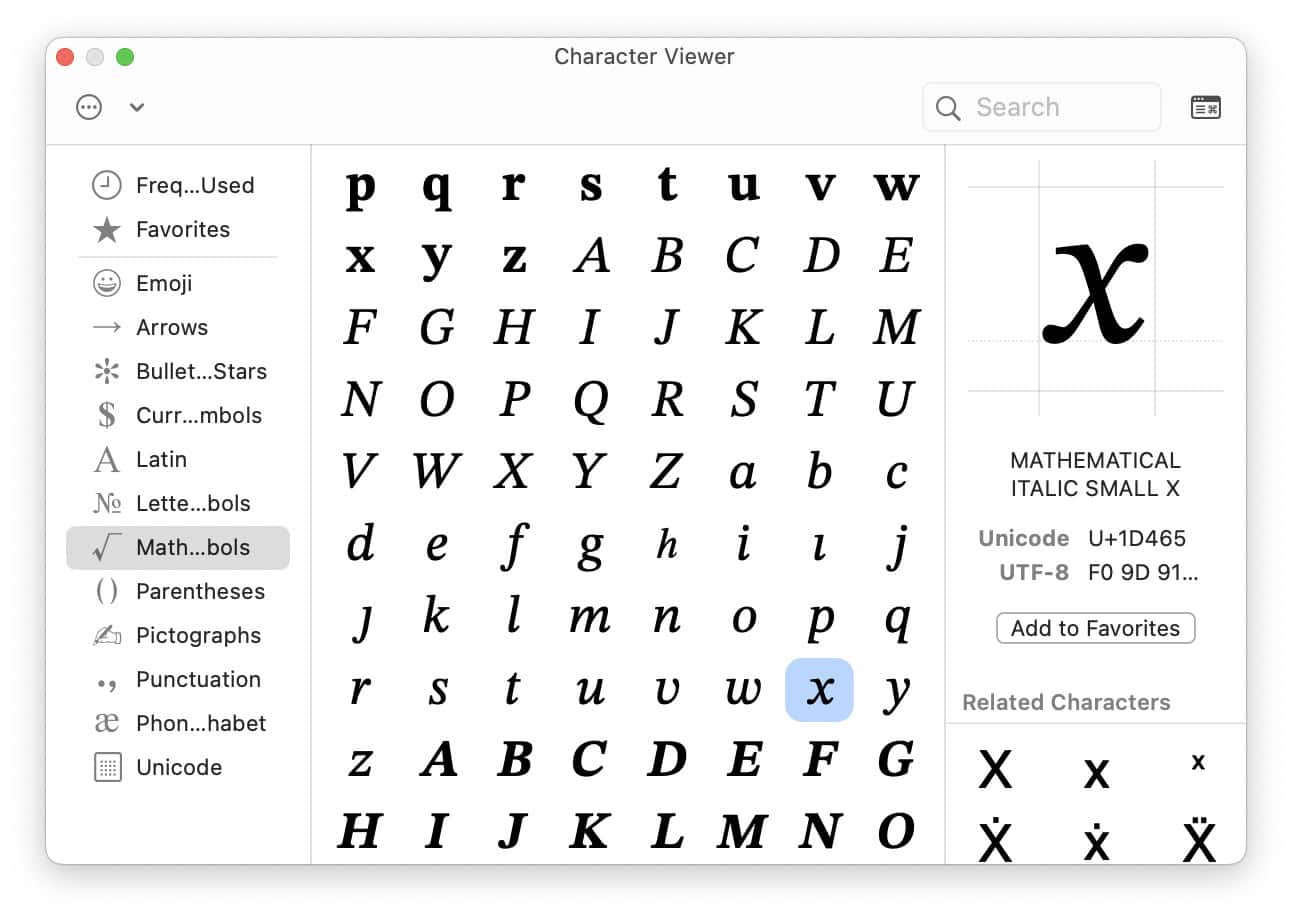
- Now click the Search field in Character Viewer.
- Type
combining overline.Alternative: You can also search for U+0305 to find by Unicode code point instead.
Alternative overline: In lieu of the overlie, you can also use the macron; search forcombining macron.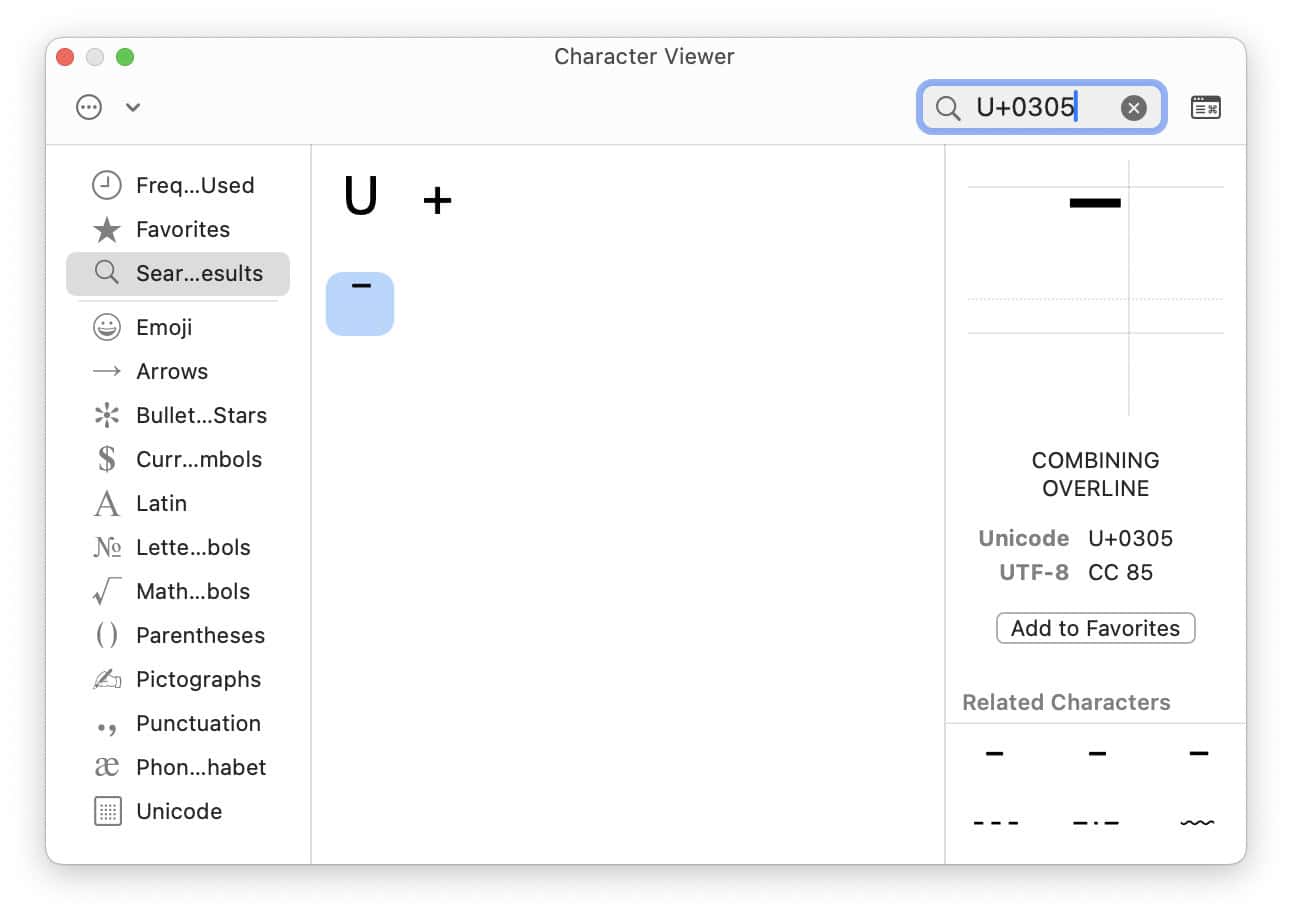
- Double-click the combining overline character to insert it immediately after the mathematical letter ‘x’.

Wish the bar that is the cursor would not blink? How to Turn Off Cursor Blinking on a Mac
Using Text Replacement
If you insert x bar frequently, you can set up a text replacement that will let you input the character using a key combination.
To set up a text replacement for x bar on a Mac:
- Open System Settings on the Mac.
- Go to the Keyboard category.
- Click Text Replacements….
- Click +.
- Type the key sequence you want to be replaced with x bar under Replace.
Example: The modestx_barwill work (unless you code in snake case). - Produce or paste the x bar character you want to use using the method above or the copying table below.
- Click Add.
- Now click Done.
Now, to insert the x bar character:
- Type the key sequence you have set up to be replaced with x bar.
- Press Space, Enter or a punctuation character.
Type x-Bar ( 𝑥̅ ) on a Mac: FAQ
Can I also copy and paste x-bar?
Yes.
x bar (serif italic) 𝑥̅ | |
x bar (serif italic) 𝑋̅ |
x bar (serif bold italic) 𝒙̅ | |
x bar (serif bold italic) 𝑿̅ | |
x bar (serif bold) 𝐱̅ | |
x bar (serif bold) 𝐗̅ | |
x bar (cursive) 𝓍̅ | |
x bar (cursive) 𝔁̅ | |
x bar (sans-serif italic) 𝘹̅ | |
x bar (sans-serif italic) 𝘟̅ | |
x bar (sans-serif bold italic) 𝙭̅ | |
x bar (sans-serif bold italic) 𝙓̅ | |
x bar (sans-serif) 𝗑̅ | |
x bar (sans-serif) 𝖷̅ | |
x bar (sans-serif bold) 𝑥̅ | |
x bar (sans-serif bold) 𝘅̅ | |
x bar (proportional) 𝚡̅ | |
x bar (proportional) 𝚇̅ | |
x bar (double-struck) 𝕩̅ | |
x bar (double-struck) 𝕏̅ | |
x bar (Fraktur) 𝔵̅ | |
x bar (Fraktur) 𝖝̅ |
Can I also use a regular (non-“mathematic”) letter ‘x’?
Yes, of course.
You can combine the overline or macron with any letter to produce a barred version of the letter (x̅).
(Tested with macOS Tahoe 26.2 and Sequoia 15.1; first published December 2024, last updated December 2025)