

Worn out and tired of Yahoo Mail running slow with a bloated interface? You can go back to simpler times — and a faster interface that just works. Find out here how to switch to and open basic Yahoo Mail to read and write emails with a lightweight, speedy interface in your browser.
First, the Car That Carries More Than Its Own Weight
Peel Engineering’s P50, manufactured during the 1960s on the Isle of Man, famously offered transportation for “one adult and a shopping bag,” easily 165 lb (or 75 kg).
The car itself weighed in at 130 lb (just shy of 59 kg).
With that in mind, can I interest you in lightweight access for one adult and an email account? A shopping bag is not required, but you may bring a snack or two.
How to Switch to a Yahoo Mail Basic in Any Browser
Time needed: 1 minute
To open the basic, fast HTML version of Yahoo Mail in your browser from old Yahoo Mail:
- Click the Settings Menu gear icon in Yahoo Mail’s old desktop version.
New Yahoo Mail: In the current version of Yahoo Mail, you will not find a link to Yahoo Mail Basic; you can still access the basic version using its direct link, though (see below).
- Select More Settings on the sheet that has appeared.
- Now follow the Switch to basic Mail link in the left navigation menu.
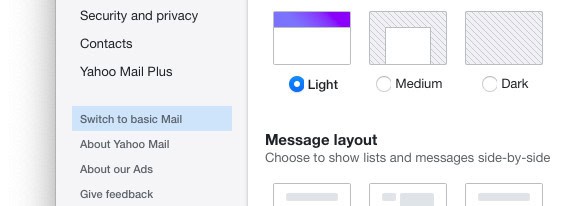
Use a Direct Link to Open Basic HTML Yahoo Mail
To access basic Yahoo Mail directly for a simple and swift email experience:
- Go to https://mail.yahoo.com/b/ in your browser.
Bookmark: Make a bookmark for the URL to visit simple HTML Yahoo Mail even faster. - Sign in if you are prompted.
How to Switch to a Yahoo Mail Basic in Any Browser: FAQ
How can I switch back to fully featured, new Yahoo Mail?
To return to Yahoo Mail’s fully featured version:
- Click Switch to the newest Yahoo Mail in the Yahoo Mail basic inbox.
Direct link: The link for opening full desktop Yahoo Mail is https://mail.yahoo.com/d/ .
Can I use Basic Yahoo Mail on a mobile device?
No.
On a mobile device, Yahoo Mail will always come in its mobile HTML interface.
What are the differences between the full and basic versions?
Yahoo Mail in simple HTML offers rudimentary functions for reading and sending email:
- Read and file messages.
- Manage folders.
- Write plain text emails and replies.
To change settings, set up rules and forwarding and block senders, or to use rich formatting in emails, use the full desktop version of Yahoo Mail.
(Tested in a desktop browser; first published October 2020, last updated January 2026)