
You move but a few words, and the whole formatting breaks? You delete a space, and everything shifts? If it seems that formatting characters are conspiring against you in secret, It’s because — they are. Find out here how to show invisible characters (such as column breaks, tabs and non-breaking space) in Apple Pages for Mac ⤓ so you get a clear view of formatting oddities.
On This Page
How to Show Invisible Characters in Apple Pages for Mac (Fix Formatting Issues)
Time needed: 1 minute
To view formatting and control characters in a document with Apple Pages for Mac:
- Select View | Show Invisibles from the menu in Pages.
Pages keyboard shortcut: You can press Command Shift I to toggle display of invisible characters.
- Find invisible characters rendered in light blue.
Custom color: While a light azure blue is the default color, you can pick your own style for invisible characters; see below.
Invisible again: Select View | Hide Invisibles from the menu to turn display of indivisible characters off again.
Not just find: Using search, you can also mass-replace formatting characters.
Their word: Apple include information on showing invisible characters in the Pages User Guide.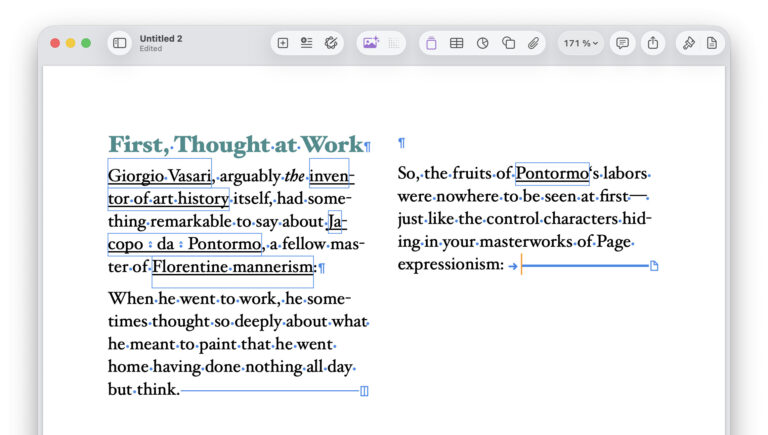
Invisible Characters in Pages and Their Meaning
| Display | Invisible Character | Purpose | Common Issues |
|---|---|---|---|
 | space, hair space, thin space, en space, em space | separates words | unexpected whitespace |
 | non-breaking space, narrow non-breaking space, figure space | keeps words together | text wrapping in odd places |
 | tab | aligns text | misaligned columns |
 | carriage return, line feed | ends a paragraph | extra blank lines |
 | Line break | ends a line | extra blank lines |
 | page break | starts a new page | unexpected page jumps |
 | section break | creates new section | heading or numbering changes |
 | column break | moves text to next column | odd multi-column layout |
 | unrecognized invisible |
Got a vision for characters?
Tips help fuel these email and tech how-tos.
How to Show Invisible Characters in Apple Pages for Mac (Fix Formatting Issues): FAQ
Can I change the color for displaying invisible characters?
Yes.
To change the color for invisible characters in Pages:
- Select Pages ] Settings… from the menu.
- Go to the General tab.
- Click the current color under Invisibles.
- Choose the desired color.
Example: Choose a light gray to have the characters fade into the background.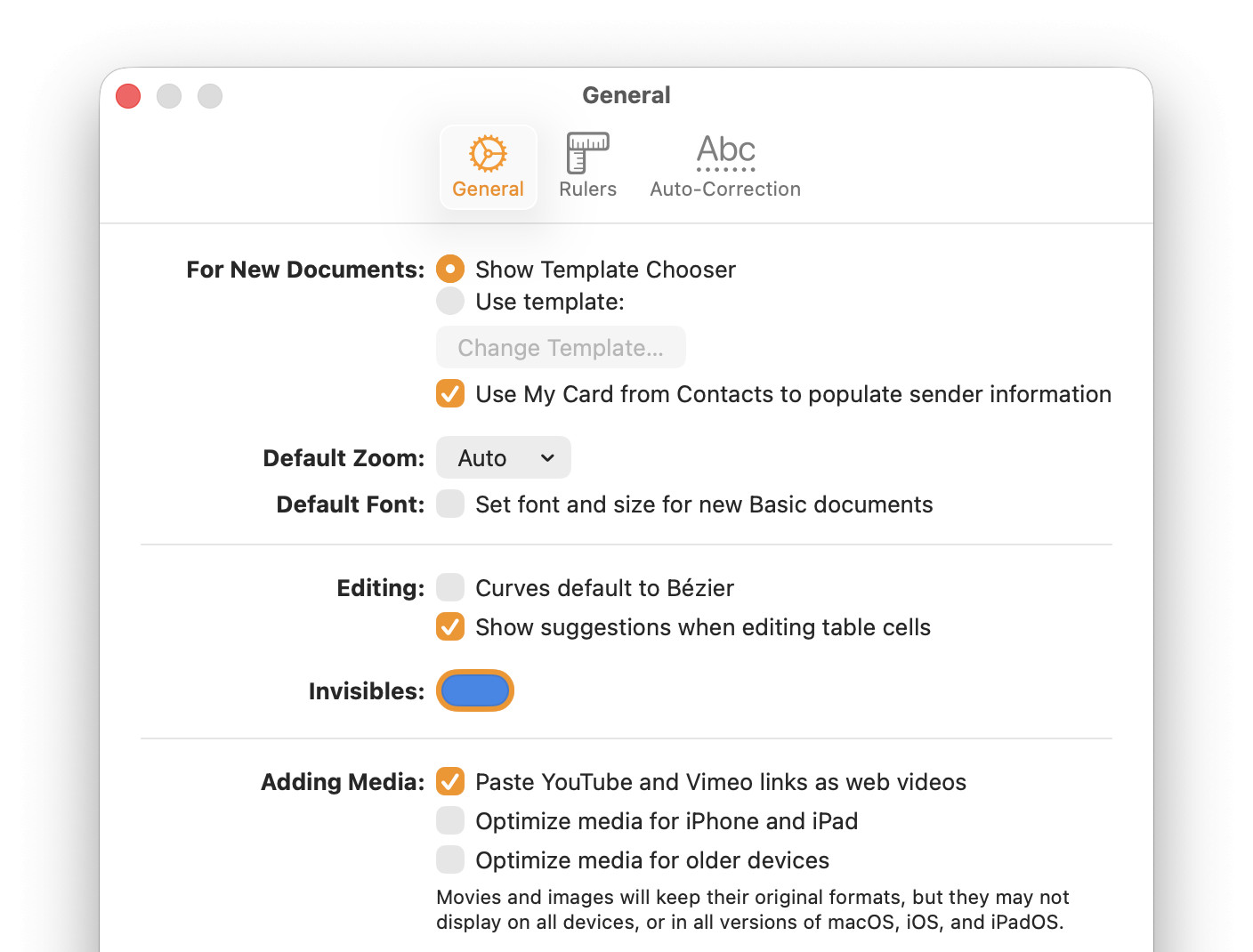
By default, Pages renders invisible characters using a light azure (HEX #2f87eb) and does not change the color depending on the background. On a light azure background, the characters displaying invisible characters become invisible themselves.
Put together the perfect starter document, hidden characters and all?
How to Use Templates in Pages and Numbers
Will Pages display zero-width space characters with “Show Invisibles” enabled?
No.
Pages reveals only characters that are either whitespace themselves or alter how text is displayed. Turning on Show Invisibles will not reveal hidden characters or zero-width space.
Can I make hidden formatting characters visible in Pages for iPhone?
No.
Pages does not offer a means to reveal invisible formatting characters on iPhone and iPad. You can search for formatting characters in Pages, however, and have them highlighted individually.
Does showing invisible characters change the document?
No.
Having Pages display invisible characters only changes what you see while you are editing. It does not alter the document’s content or formatting — or what appears when you export or print it.
(Tested with Pages 15 on macOS Tahoe 26; first published March 2026, last updated September 2026)