

Facing a desktop littered with “New Folder” and “Misc” clutter too, dreading the slow process of renaming the lot? Find out here how to quickly rename folders on Windows ⤓ using shortcuts, right‑click menus, and the classic command prompt.
On This Page
How to Quickly Rename Folders on Windows 11 and Windows 10
Renaming in Windows Explorer
Time needed: 1 minute
To rename a folder fast on Windows:
- Open Windows File Explorer.
Here’s how: You can select File Explorer in the Start menu, for example.
Windows keyboard shortcut: Press Windows E to open Windows Explorer. - Go to the folder that contains the folder you want to rename.
Example: If you have a folder called “La De Da” in Documents, go to the Documents folder.
- Highlight the folder you want to rename.
- Now select its name for editing.
Here’s how: Click the folder name (not the folder icon) once while the folder is selected.
File Explorer keyboard shortcut: Press F2 to select the current name for editing.
Using the toolbar or context menu: You can also select Rename in the Explorer toolbar or the folder’s context menu (you can click on the current name with the right mouse button to open the context menu).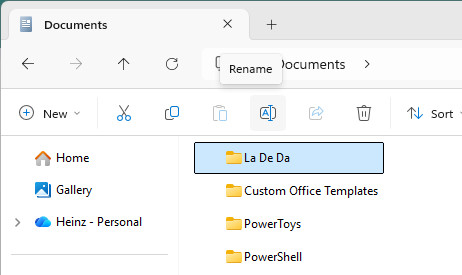
- Type the name you want to use from now on for the folder.
Example: Type
La De Duto rename the “La De Da” folder.
Their word: Microsoft include information on using Explorer in Windows help.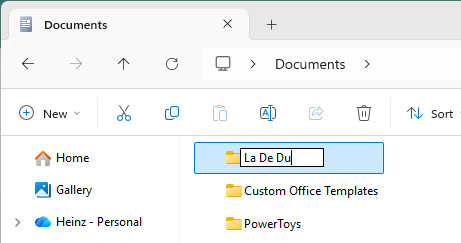
- Press Enter.
Make something to rename: How to Create a New Folder in Windows (Incl. “mkdir”)
Using the Command Line to Rename Folders
To change the name of a folder in Windows PowerShell, CMD.EXE or the MS-DOS command prompt:
- Open PowerShell or CMD.EXE.
- Type
move <current folder name> <new folder name>.
Paths: If the folder you want to rename is not a folder in the current directory, you can use the full folder path (e.g.,C:\Users\…) or, more conveniently, usecdto go to the enclosing folder.
Whitespace: Surround folder names with quotation marks if they contain whitespace characters.
Example: Typemove 'La De Da' 'La De Du'to rename the folder called “La De Du” in the current directory. - Press Enter.

It’s a… new name!
Tips help fuel these email and tech how-tos.
How to Quickly Rename Folders on Windows 11 and Windows 10: FAQ
Can I rename a folder without opening its enclosing folder first?
Yes.
To change the name of the folder currently displayed in Windows File Explorer:
- Open the folder you want to rename in File Explorer.
- Take care that no items are selected.
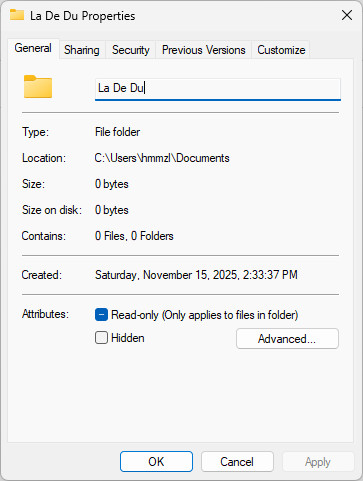
Here’s how: Press F5 or choose Select none in the toolbar. - Select Properties in the toolbar.
No “Properties”: Click the three dots See more button to reveal Properties. - Edit the name as desired.
- Click OK.
(Tested with Windows 11 Version 25H2; first published November 2025, last updated June 2026)