

Need the squared symbol (²) on your Linux machine (for a formula, say, or area measure), and the keyboard lacks just that vital key? Copy-paste works once or twice, but turns tedious quickly. Find out here how to insert the squared sign (²) on Linux ⤓ (using a key combination, the “Compose” key or a character picker).
On This Page
How to Insert the Squared Sign ( ² ) on Linux
Using a Key Combination
Time needed: 1 minute
To type the symbol for “squared” ( ² ) on Linux using the keyboard alone:
- Add and turn on the US-English International keyboard layout.
Here’s which: Choose the English (US, intl., with dead keys) layout.
Other layouts: You can also switch to the English (US, Symbolic) keyboard layout for squared and other superscripted numbers. - Position the text cursor where you want to insert the raised number ‘2’.
Here’s where: The sign for squared appears immediately after the number or symbol that is squared; If you use the raised number for a footnote, let it follow the passage in the text immediately as well; the footnote itself is also not separated from the raised number by any whitespace.
- Press AltGr 2 or Alt 2 (using the right Alt key).
Example: The gateway arch can be approximated with the equation y = 630 - 0.0635 x².

Exponential improvement achieved?
Tips help fuel these email and tech how-tos.
Using a Character Picker
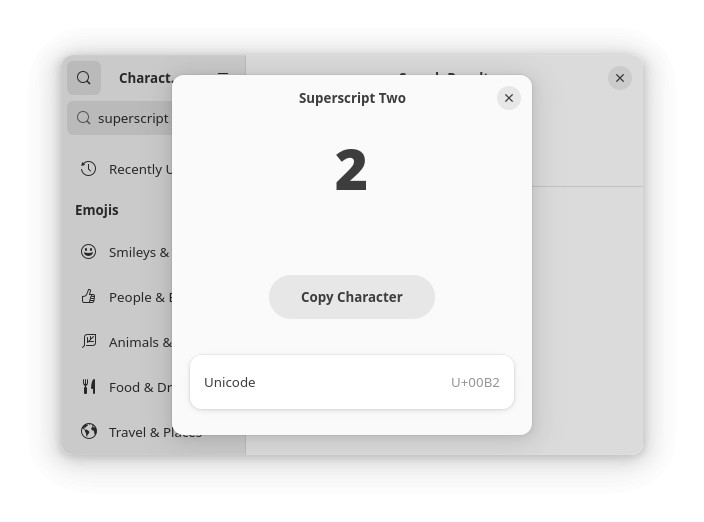
To find and copy the character for the squared symbol using a character picker on Linux:
- Open KDE KCharSelect or the Characters app on Gnome.
- Search for
superscript two.
Other superscripted characters: Search forsuperscriptalone, of course, to discover additional superscripted characters. - Highlight and copy the squared symbol ².
More superscript characters: How to Insert Superscript Letters on Linux
Using the “Compose” Key
To input the squared symbol using the “Compose” key on Linux:
- Define and enable the “Compose” key.
- Place the text insertion cursor where the superscripted ‘2’ is to appear.
- Press Compose.
- Type 2.
- Now press Shift 6 (for
^, caret).
On a Mac? Type “Squared” ( ² ) on a Mac

How to Insert the Squared Sign ( ² ) on Linux: FAQ
Can I insert other raised numbers as well?
Yes.
You can input raised numbers using direct key combinations, the “Compose” key and Unicode.
Keyboard Layouts
Using the US-English International keyboard layout, you can insert the following superscripted numbers:
| Character | English International | Symbolic |
|---|---|---|
| ² | AltGr 2 | AltGr 2 |
| ³ | AltGr 3 | AltGr 3 |
| ¹ | AltGr Shift 1 | AltGr 1 |
| ⁴ | AltGr 4 | |
| ⁵ | AltGr 5 | |
| ⁶ | AltGr 6 | |
| ⁷ | AltGr 7 | |
| ⁸ | AltGr 8 | |
| ⁹ | AltGr 9 | |
| ⁰ | AltGr 0 |
“Compose” Key
The Compose key allows for inserting the following additional raised numbers:
| Character | Key Sequence |
|---|---|
| ² | Compose 2 Shift 6 |
| ³ | Compose 3 Shift 6 |
| ¹ | Compose 1 Shift 6 |
Can I enter the squared symbol using its Unicode code point?
Yes.
To insert the superscript 2 using Unicode on Linux:
- Press Ctrl Shift U.
- Type
00B2for ‘²’.
Other numbers: Find the codes for other superscripted numbers below. - Press Enter.

Unicode Code Points for Superscripted Numbers
| Character | Unicode code point |
|---|---|
| ² | 00B2 |
| ³ | 00B3 |
| ¹ | 00B9 |
| ⁴ | 2074 |
| ⁵ | 2075 |
| ⁶ | 2076 |
| ⁷ | 2077 |
| ⁸ | 2078 |
| ⁹ | 2079 |
| ⁰ | 2070 |
Can I copy and paste the superscripted numbers including ‘²’.
Yes.
Use the tables below to copy the symbol for squared as well as all other superscripted digits as Unicode characters for pasting anywhere on Linux:
superscript two ² |
superscript one ¹ | |
superscript three ³ | |
superscript four ⁴ | |
superscript five ⁵ | |
superscript six ⁶ | |
superscript seven ⁷ | |
superscript eight ⁸ | |
superscript nine ⁹ | |
superscript zero ⁰ |
(Tested with Gnome 46–49 and KDE Plasma 6.2, first published January 2025, last updated August 2026)