

Tired of spelling out “degrees” every time? Wondering how to shorten “degrees Celsius” in style? Find out here how to insert the degree symbol ( ° ) on Linux ⤓ using Gnome and KDE (as well as the symbols for ℃ and ℉).
On This Page
How to Insert the Degree Symbol ( ° ) on Linux
⚡ Quick Fix
US-English Mac keyboard layout: Press AltGr 0.
“Compose” key: Press Compose, then type oo.
Unicode: Press Ctrl Shift U, then type 00B0 and press Enter.
Using the Keyboard (US-English Macintosh Layout)
Time needed: 1 minute
To type the symbol for degrees ( ° ) using the keyboard on a Linux computer:
- Add the US-English (Macintosh) keyboard layout and switch to it for the current application.
Here’s why: Unlike the standard English (US) keyboard layout, the Mac layout includes a shortcut for the degree symbol.
Here’s how: Both Gnome and KDE let you add and change keyboard layouts comfortably. - Place the text cursor where you want to insert the degree sign ( ° ).
Here’s where: For degrees of temperature, for instance, follow the number with a non-breaking space, then the degree symbol, which is followed by the letter to represent the scale.
Example: I think espresso should be prepared at 203 °F, not one degree more or less.
Temperature symbols: As an alternative, you can also use Unicode temperature symbols that combine the degree sign and letter; see below. - Press AltGr 0.
No “AltGr”: If you have no AltGr key (e.g., appropriately using a Mac keyboard), press Option 0.
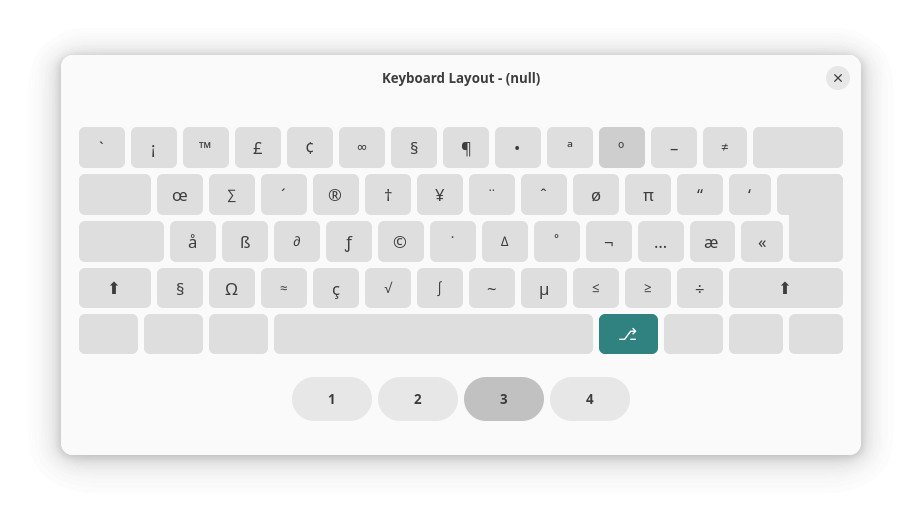
- Optional: Switch back to the US-English keyboard layout.
Increasing ° of accomplishment?
Tips help fuel these email and tech how-tos.
Using the “Compose” Key
You need not switch keyboard layouts to insert the degree symbol fast, though — no matter the keyboard or layout.
To input the degree symbol on a Linux machine using the Compose key:
- Define a Compose key and enable it for input.
- Put the text cursor where the degree symbol is to appear; see above.
- Press the Compose key.
- Now type
oo(the lowercase letter ‘o’ twice).
Here’s what happens: The two lettersoowill be replaced with the degree sign°.
Speaking of Macintoshes: How to Type the Degree Symbol ( ° ) on a Mac Keyboard
Using a Character Picker
To copy a degree symbol for pasting using a character picker on Linux using KDE or Gnome:
- Launch Gnome Characters or KDE KCharSelect.
- Search for
degree. - Pick and copy the desired degree symbol ‘°’, ‘℃’, or ‘℉’.
Also has a character picker: How to Make the Degree Symbol on Windows
How to Insert the Degree Symbol ( ° ) on Linux: FAQ
Can I insert the degree sign (or degrees Celsius ℃) using Unicode?
Yes.
To enter the degree symbols using Unicode code points on Linux:
- Press Ctrl Shift U.
- Type
00B0for the degree character '°'.
Celsius: Use2103for the degrees Celsius symbol ‘℃’.
Fahrenheit: Write2109for degrees Fahrenheit ‘℉’. - Press Enter.

Can I copy the degree symbol for pasting here?
Yes.
Copy the desired degree symbol from the table below.
Degree sign ° | |
Degrees Fahrenheit sign ℉ | |
Degrees centigrade sign ℃ |
A font does not include the symbol for degrees Fahrenheit or Celsius; what can I do?
If a font lacks the symbol for ℉ or ℃, you can do the following:
- Change the font just for the symbol; a typeface from the Noto family might work, for example.
- Combine the degree symbol
°with the lettersCorF.
Example: On a mountain, water will boil at less than 100 °C. - Use the words
degreeanddegreesinstead of other symbol°.
Example: The chocolate is 87 degrees F, you can take it off the stove.
(Tested with Gnome 47–50 and KDE Plasma 6; first published March 2025, last updated July 2026)