

Looking to add three vertical dots — a vertical ellipsis or ‘⋮’ — In your LaTeX document? You can use the horizontal dots in a matrix, of course, or for a representation of the three-dots menu. Find out here how to insert vertical dots as an ellipsis ( ⋮ ) in LaTeX.
First, Planes Are Being Pushed Around
On the ground, airplanes are pushed around at alarming rates, and pushed back most of all!
The vehicles that do the pushing (or dragging) on airports are the pushback tractors. In the early days of aviation, planes mostly got going and stopping on fields, and it was the nearby farmers with tractors that help push them into position (or out of the way). That’s why the machines that look nothing like tractors still bear the name today.
There is, of course, no evidence to be found for this charming folk etymology (and the tractors are tractors because they pull). Let’s not just drag along horizontally on the surface, though, but also dig in a bit vertically:
How to Insert Three Vertical Dots (Ellipsis ⋮ ) in LaTeX
Time needed: 2 minutes
To use a vertical ellipsis (three vertical dots) in a LaTeX document:
- Go to the position in your document where the vertical ellipsis should appear.
Here’s where: In normal text, you will hardly use a vertical ellipsis except as a special character; treat it mostly like a word of its own.
Whitespace: If you want to surround the ellipsis with whitespace, you can use\hspace{}, of course. - Use
\vdotsto insert the vertical ellipsis.Math mode: The
\vdotscommand works just as well in math mode; for more math dots, see below.
How to Insert a Vertical Ellipsis in LaTeX: Example
Open the three-dots \emph{menu} button (\hspace{0.2em}\raisebox{-.4ex}{\textbf{\vdots}}\hspace{0.2em}).This will display as the following:

Also just text: How to Make a Three-Dots Menu Button in Unicode
Insert Horizontal and Diagonal Ellipses in LaTeX
To insert ellipses as well as three horizontal and diagonal dots in LaTeX
| Ellipsis | Text Mode | Math Mode |
|---|---|---|
| … | \ldots\textellipsis | \ldots\mathellipsis |
| ⋯ | \cdots | \cdots |
| ⋱ | \ddots | \ddots |
| ⋰ | \udots (MnSymbol) | \iddots (mathdots)\udots (MnSymbol) |
Dots Example in LaTeX Math Mode
\usepackage{amsmath}
[…]
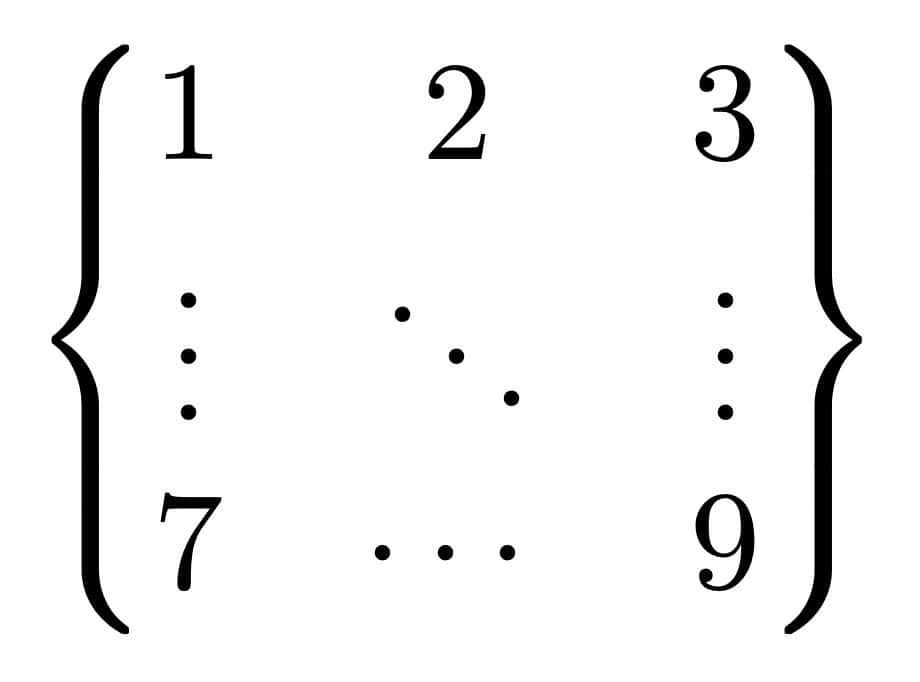
\begin{math}
  \begin{Bmatrix}
    1 & 2 & 3\\
    \vdots & \ddots & \vdots\\
    7 & \cdots & 9
  \end{Bmatrix}
\end{math}
This results in the following output:
(Tested with LaTeX 3; first published October 2024, last updated November 2025)