

Want to save emails from Proton Mail in decrypted form? Tired of archiving important ones outside Proton Mail one by one? Find out here how to export emails from Proton Mail ⤓ — individual messages or the whole lot — in encrypted or decrypted form.
First, Not an Oxymoron in Space
Here’s an idea: a drip coffee maker for outer space (or, say, the International Space Station ISS).
All right, I admit it: that sounds more like an oxymoron than an idea worth pursuing.
A French press might work better, or — I know! — an espresso machine. Unlike siblings relying on gravity, the ISSpresso maker did exist. It heats standard water pouches and presses the liquid through ground coffee (in special capsules) like any respectable espresso machine would.
Now that we have extracted, at least in thought, caffeine and aroma without the help of gravity; let’s extract Proton Mail email and headers with the help of a browser — and in deed:
How to Export Email from Proton Mail
Export an Email as a Decrypted EML File from Proton Mail
Time needed: 1 minute
To save an email from Proton Mail in EML file format in decrypted fashion:
- Open the email you want to export in Proton Mail on the web.
- Click the three dots menu button for the message.
- Select Export from the menu that has appeared.
- Proton Mail will download the message source as an EML file with the subject line and date as the file name.
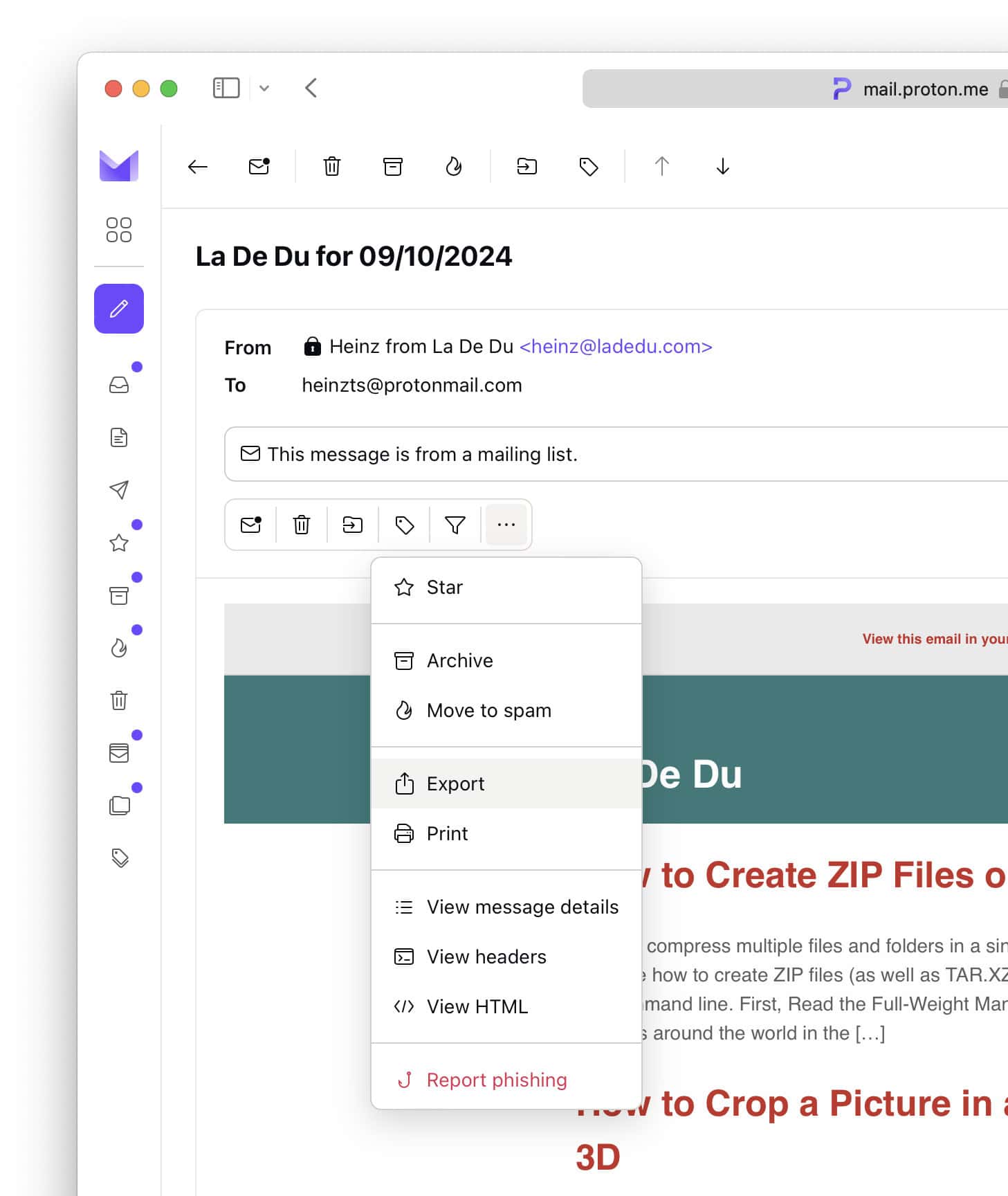
Local copy downloaded and decrypted?
Tips help fuel these email and tech how-tos.
Export an Email as an Encrypted EML File
To export a message encrypted with your Proton Mail’s private PGP key:
- Open the email in Proton Mail on the web.
- Click the three dots menu icon
- Select View headers from the menu.
- Now click Download.
Here’s what you get: This will download the message in encrypted form as a file called pgp.txt by default.
Decrypt: You can decrypt the email text using GnuPG and your private Proton Mail key.
Export Emails in Bulk Using the Proton Mail Export Tool
To download all emails from a Proton Mail account as decrypted EML files:
- Download the Proton Mail Export Tool for your platform.
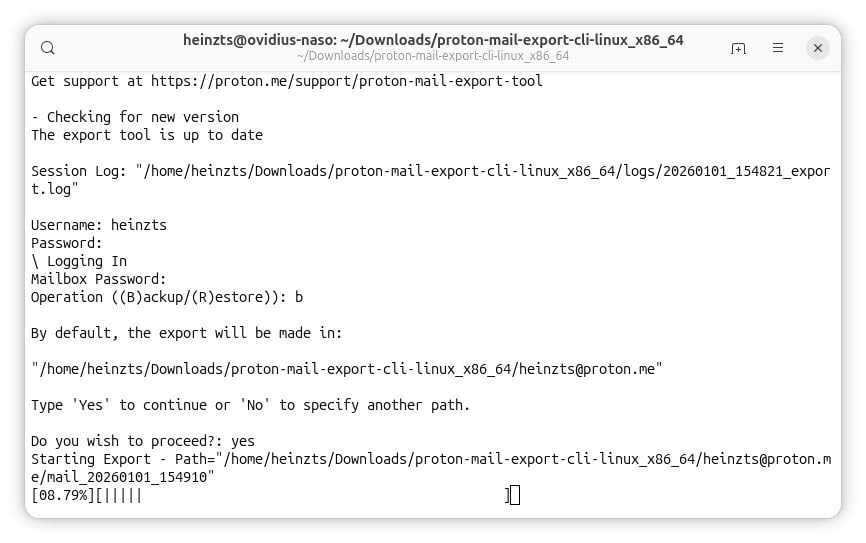
- Extract the files from the downloaded archive and open the program proton-mail-export-cli.
Linux: On Linux, it’s typically best to launch the program on a terminal command line. - Type your Proton Mail user name under Username:. and press Enter.
Enter: Also press Enter to input all following inputs. - Now enter your Proton Mail password under Password:.
- Enter the password with which your emails are encrypted under Mailbox Password:.
- Type
bfor (B)ackup. - Type
Yesto accept the default export location.
Here’s where: By default, the Proton Mail Export Tool will save EML files to a folder named like the email address under the current directory. - Wait for export to finish.
Export Emails in Bulk Using Proton Bridge
To save and export any number of select emails from Proton Mail to a desktop computer:
- Install and set up Proton Bridge.
- Configure an email program to access your Proton Mail account through Proton Bridge using IMAP.
- Export the emails from the email program as desired.
Exported everything to erase the account? How to Delete a Proton Mail Account
How to Export Email from Proton Mail: FAQ
Can I download multiple emails as EML files in one go?
No.
Proton Mail only lets you view and download the headers and encrypted source for a single email and can only decrypt and download one message at a time.
You can export multiple emails in one go using Proton Bridge, of course; see above.
(First published October 2024, last updated January 2026)